Comparing Boolv Video Maker and Popular Video Editing Software in 2025

If you want to make a video fast, you might look at Boolv Video Maker. This easy video editing software stands out for its smart ai video editor features. You do not need to be an expert. Beginners and marketers find the ai tools helpful for video creation and quick projects. The best ai video editor in 2025 uses ai to speed up editing and suggest scenes. Many users choose this ai video editor because it saves time and makes video editing simple. You can see how ai changes the way you edit videos today.
Quick Comparison Table
Boolv Video Maker vs. Best Video Editing Software
When you pick the best video editing software, you want it to match your needs. Some tools let you do deep editing. Others help you make a video fast. Here is a table that helps you compare Boolv Video Maker with other top choices in 2025:
Software | Speed | Automation | Ease of Use | Editing Depth | Pricing Model |
|---|---|---|---|---|---|
Very Fast | Advanced AI tools | Very Easy | Basic-Medium | Subscription, Free Plan Available | |
Adobe Premiere Pro | Moderate | Limited AI | Moderate | Advanced | Subscription |
Final Cut Pro | Moderate | Limited AI | Moderate | Advanced | One-time Purchase |
iMovie | Fast | Basic Automation | Very Easy | Basic | Free (Mac only) |
Filmora | Fast | Some AI Features | Easy | Medium | $19.99/month or $89.99 lifetime |
Camtasia | Moderate | Basic Automation | Easy | Medium | One-time Purchase |
DaVinci Resolve | Moderate | Limited AI | Moderate | Advanced | Free & Paid Versions |
📝 Tip: If you need to make a video fast, Boolv Video Maker is a good pick. It uses smart automation and AI-powered scene generation. You can turn text into video and add voiceovers. There are templates for many industries. Boolv lets teams work together in real time. It also connects with Canva and Adobe Premiere Pro. This helps teams and marketers work better.
Key Features Overview
You may ask what makes each tool special. Here are some main features that make them different:
Boolv Video Maker has AI tools for matching scenes, turning text into video, and adding voiceovers. You can make videos in many languages and use templates for many needs.
Adobe Premiere Pro and Final Cut Pro have deep editing features. You get more control, but they take longer to learn.
iMovie is simple and free for Mac users. It is good for basic video projects.
Filmora is easy to use and has some AI features. You can pay once or pay every month.
Camtasia lets you record your screen and edit videos for tutorials.
DaVinci Resolve has advanced color grading and editing. It can be hard for beginners.
If you want the best video editing software for quick and easy projects, Boolv Video Maker is a strong choice. If you need more advanced editing, you might pick Premiere Pro or DaVinci Resolve.
Features Comparison
Interface and Workflow
When you open Boolv Video Maker, you see a clean dashboard. You can start your project with just a few clicks. The workflow feels smooth. You drag and drop clips, add text, and pick templates. You do not need to search for hidden buttons. The best ai video editor gives you smart suggestions. You get help from ai at every step. If you use Adobe Premiere Pro or DaVinci Resolve, you see more complex menus. These video editing tools offer deep editing, but you need time to learn the workflow. iMovie and Filmora keep things simple, but they do not match Boolv’s speed. You can finish a video in minutes with Boolv. Teams can work together in real time. You see changes as they happen. This makes your video editing workflow fast and easy.
If you want to create a video quickly, Boolv’s interface saves you time. You do not need to watch long tutorials. You can jump right in and start editing.
AI Tools and Automation
Boolv Video Maker stands out for its ai video editor features. You get smart scene matching. The ai picks the best clips for your story. You can turn text into video with a few clicks. The ai adds voiceovers in many languages. You do not need to record your own voice. The best ai video editor uses a.i. driven features to speed up your workflow. You get automatic transitions and music suggestions. Adobe Premiere Pro and Final Cut Pro offer some ai editing tools, but they focus more on manual control. Filmora adds basic ai, but Boolv’s automation feels smarter. You can finish editing faster. You do not need to adjust every detail. The ai does the hard work for you.
Boolv’s ai helps you:
Match scenes to your script
Add voiceovers and subtitles
Suggest music and effects
Export videos in different formats
Effects and Templates
You want your video to look good. Boolv Video Maker gives you many templates. You pick one for your industry, like marketing or education. The ai fills in scenes and text. You get effects like transitions, filters, and animated text. You do not need to design from scratch. The best ai video editor lets you preview changes in real time. Adobe Premiere Pro and DaVinci Resolve offer more advanced effects, but you need to learn how to use them. iMovie and Camtasia keep effects simple. Filmora gives you fun filters and stickers. Boolv’s templates help you finish projects faster. You can make high-quality output without much effort.
Tip: If you want to make a promo video or social media ad, Boolv’s templates save you hours. You can focus on your message, not the design.
Compatibility and Export
You want your video to play everywhere. Boolv Video Maker supports many file types. You can export to MP4, MOV, and more. The ai helps you pick the best settings for your platform. You can share videos on YouTube, Instagram, or TikTok. Teams can export projects and send them to Canva or Adobe Premiere Pro. This makes Boolv flexible. Adobe Premiere Pro and DaVinci Resolve support even more formats, but you need to set up export options yourself. iMovie works best for Apple devices. Filmora and Camtasia offer easy export, but Boolv’s ai makes it even simpler. You get high-quality output every time.
Boolv supports:
MP4, MOV, AVI, and more
Direct sharing to social media
Team exports for collaboration
If you want easy exporting and wide compatibility, Boolv Video Maker gives you what you need. You do not need to worry about file types or settings. The ai takes care of it.
Usability and Learning Curve

Onboarding Experience
When you start using Boolv Video Maker, you notice how simple it feels. The dashboard looks clean. You see big buttons and clear labels. You do not need to guess what to do next. The ai guides you step by step. You upload your clips, and the ai suggests the best scenes. You can turn your ideas into a video in just a few minutes. If you get stuck, the ai offers tips and hints right on the screen.
Other editing tools like Adobe Premiere Pro or DaVinci Resolve can feel overwhelming. You see many menus and options. You might need to watch long tutorials before you make your first video. Boolv’s ai makes the onboarding process much easier. You feel confident from the start.
Tip: If you want to jump into video creation without reading a manual, Boolv’s ai-powered onboarding helps you get started fast.
Beginners vs. Professionals
You might wonder if Boolv Video Maker works for both beginners and people who want a professional finish. If you are new to editing, you will love how the ai does most of the hard work. You pick a template, add your text, and let the ai match scenes and music. You do not need to know about timelines or layers. The ai even helps you with voiceovers and subtitles.
If you want more control, you might look at other editing software. Tools like Final Cut Pro or DaVinci Resolve give you deep editing features. You can adjust every detail for a professional finish. Boolv focuses on speed and ease. The ai makes sure your video looks polished, even if you are just starting out.
Beginners get:
Easy templates
Smart ai suggestions
Fast results
Professionals get:
Quick drafts for social media
ai-powered automation for simple projects
You can use Boolv to make a video quickly. The ai helps you create something that looks good, even if you do not have much experience.
Pricing and Value
Subscription and Free Options
You want to know how much you will pay for a video editing tool. Boolv Video Maker uses a monthly subscription. You pay $29.0 each month. There is no free plan, so you need to subscribe to use all features. Filmora gives you a yearly plan for $49.99. You can try a limited free version before you buy. Camtasia asks for a one-time payment of $249.99. You get limited free options, but most features need the full version.
Here is a table that shows the costs and free options for each tool:
Video Maker | Subscription Cost | Free Options |
|---|---|---|
Boolv Video Maker | $29.0 / Monthly | None |
Filmora | $49.99 / Year | Limited Free Version |
Camtasia | $249.99 One-time | Limited Free Options |
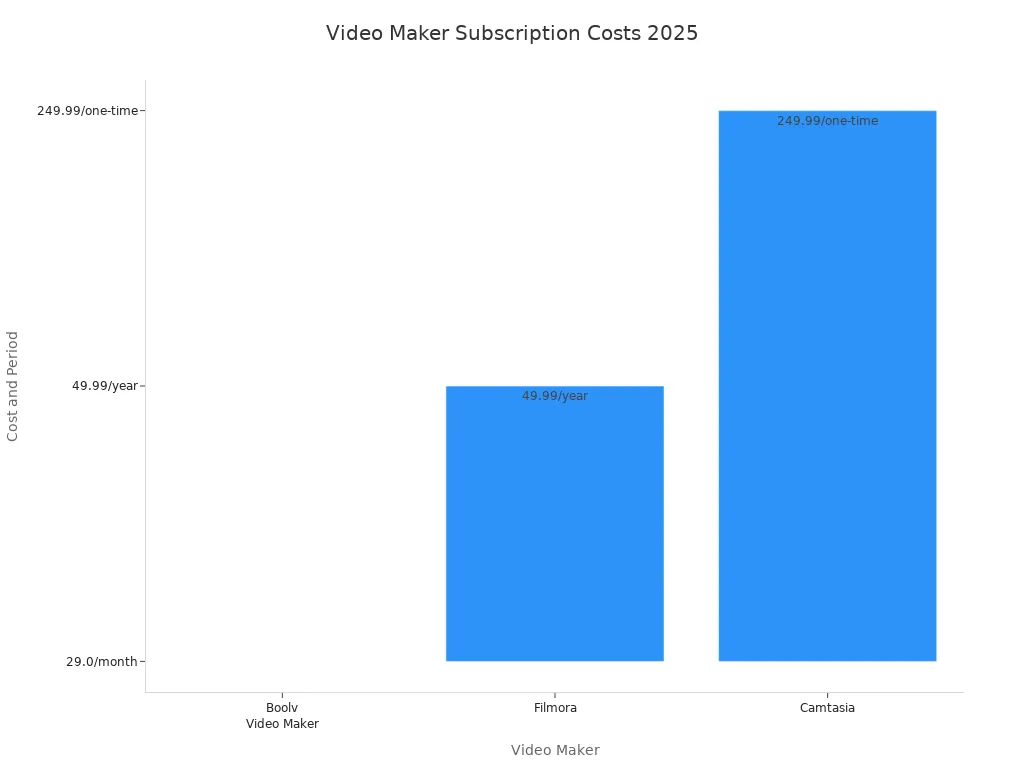
💡 If you want to test a video editor before you pay, Filmora gives you a free version. Boolv Video Maker and Camtasia do not offer full free access.
Cost vs. Features
You want the best value for your money. Boolv Video Maker gives you advanced ai tools for fast video creation. You get smart scene matching, voiceovers, and templates. The best ai video editor helps you finish projects quickly. Filmora offers some ai features, but you pay less each year. Camtasia focuses on screen recording and basic editing. You pay more upfront, but you own the software.
If you need the best ai video editor for quick projects, Boolv Video Maker stands out. You pay monthly, but you get powerful ai automation. Filmora works well for simple editing and costs less. Camtasia suits you if you want to record your screen and edit tutorials.
Boolv Video Maker: Fast ai-powered editing, monthly cost, no free plan.
Filmora: Some ai features, yearly cost, free trial.
Camtasia: Basic ai, one-time cost, limited free options.
You should think about your editing needs and budget. If you want smart ai tools and quick results, Boolv Video Maker gives you good value. If you want to save money, Filmora is a solid choice. Camtasia works best for tutorials and screen recordings.
Pros and Cons
Boolv Video Maker vs. fliki
Boolv Video Maker and fliki both use ai to help make videos. Boolv Video Maker is made for fast video work. It is good for marketers and businesses. You can turn text or pictures into a video in just minutes. The ai matches scenes, adds voiceovers, and picks music. You do not have to spend a long time editing. Fliki also uses ai, but it is best for making talking avatar videos or podcasts. If you want to make an ad or promo video, Boolv Video Maker has more templates and marketing tools. Fliki is better for voice content or explainer videos.
Pros of Boolv Video Maker:
Makes videos fast with ai scene matching
Best for marketing and product videos
Teams can work together at the same time
Cons of Boolv Video Maker:
Not as much creative control for voice avatars as fliki
Mostly for marketing and promo videos
Pros of fliki:
Strong ai voice and avatar tools
Good for podcasts and explainer videos
Cons of fliki:
Not many templates for marketing
Slower for making visual videos
If you need a quick marketing video, Boolv Video Maker is faster and more automatic. Fliki is better if you want ai voices or avatars.
Boolv Video Maker vs. Filmora
You may wonder how Boolv Video Maker compares to Filmora. Both help you make videos easily, but they are for different things. Boolv Video Maker uses ai to do most of the work. You can make a marketing video with one click. The ai picks scenes, adds text, and makes voiceovers. Filmora is easy to use and gives you more creative tools. You can add effects, transitions, and stickers. Filmora is good for all kinds of videos. Boolv Video Maker is best for ads and promo videos.
Feature | Boolv Video Maker | Filmora |
|---|---|---|
Target Audience | E-commerce and marketers | Beginners and intermediate users |
Video Creation | One-click video generation for marketing | General video editing with creative tools |
Ease of Use | Automated process for promotional content | User-friendly interface |
Creative Flexibility | Limited to marketing features | Wide range of effects and tools |
Pros of Boolv Video Maker:
Fastest way to make marketing videos
ai does most of the editing
Great for social media ads
Cons of Boolv Video Maker:
Not as many creative choices as Filmora
Not good for hard edits
Pros of Filmora:
Many effects and creative tools
Good for all types of videos
Cons of Filmora:
Takes more time to finish a video
Less automation for marketing videos
If you want to make ads fast, Boolv Video Maker is best. If you want more creative options, Filmora gives you more.
Boolv Video Maker vs. invideo
Boolv Video Maker and invideo both use ai to help you make videos quickly. With Boolv Video Maker, you can turn product pages or text into a video with a few clicks. The ai matches scenes and adds voiceovers. Invideo also has templates and ai tools, but it is better for general video making. Invideo gives you more choices, but you may spend more time editing. Boolv Video Maker is best for marketers who want to make ads or product videos fast.
Pros of Boolv Video Maker:
Very fast video making for marketing
ai matches scenes and adds voiceovers
Easy to share on social media
Cons of Boolv Video Maker:
Not as flexible for other video types
Fewer advanced editing tools
Pros of invideo:
Lots of templates for different videos
Good for marketing and general videos
Cons of invideo:
More manual editing needed
ai is not as strong for marketing
If you need a fast marketing video, Boolv Video Maker saves you time. Invideo is better if you want to try many video styles.
Boolv Video Maker vs. vidnoz
Boolv Video Maker and vidnoz both use ai, but in different ways. Boolv Video Maker is made for speed and automation in marketing videos. You can make a product video or ad in minutes. The ai does most of the work for you. Vidnoz uses ai for talking avatars and voiceovers. It is good for explainer or training videos. If you want to make a business or brand video, Boolv Video Maker has more marketing tools.
Pros of Boolv Video Maker:
Fastest for marketing and product videos
ai matches scenes and adds voiceovers
Good for team projects
Cons of Boolv Video Maker:
Not as good for avatar videos
Less creative control
Pros of vidnoz:
ai-powered avatars and voices
Good for explainer and training videos
Cons of vidnoz:
Not many marketing templates
Slower for quick promo videos
If you want to make fast marketing videos, Boolv Video Maker is the best ai video editor. Vidnoz is better if you need talking avatars or training videos.
If you want to make a video quickly, Boolv gives you an easy way to do it. Many users say they love how simple the platform feels and how the AI handles things like transitions and audio. You can upload images, add text, and finish a polished video fast. When you pick editing software, think about your skill level, what kind of project you have, and your budget.
Professionals may need more powerful features.
Free, one-time, or subscription options all have pros and cons.
FAQ
How fast can you make a video with Boolv Video Maker?
You can finish a short video in just a few minutes. The AI helps you pick scenes, add text, and choose music. You do not need to spend hours editing.
Tip: Try using a template for even faster results!
Can you use Boolv Video Maker for YouTube or TikTok?
Yes, you can! Boolv lets you export videos in formats that work for YouTube, TikTok, and other social media. You just pick your platform, and the AI sets the best size and quality.
Is Boolv Video Maker good for beginners?
Absolutely. You do not need editing experience. The dashboard is simple, and the AI guides you step by step. You can make your first video without watching long tutorials.
Does Boolv Video Maker support team projects?
Yes, it does. You and your team can work on the same video at the same time. You see changes live. This makes it easy to finish group projects quickly.
What makes Boolv Video Maker different from Filmora or iMovie?
Boolv uses AI to automate most of the editing. You get smart scene matching and voiceovers. Filmora and iMovie give you more manual control, but Boolv is much faster for marketing and promo videos.
See Also
Top Video Editing Software for Marketers in 2025
Best 10 Video Editing Applications for Android in 2024
Creating Eye-Catching Video Advertisements Using AI Tools in 2025
Streamlining Video Production for Marketing Professionals in 2025
10 Essential AI Tools for Amazon Sellers' Video Needs in 2025
Accelerate your video production
10X with Boolvideo