How to Transform Your Ideas into Videos Using AI Tools

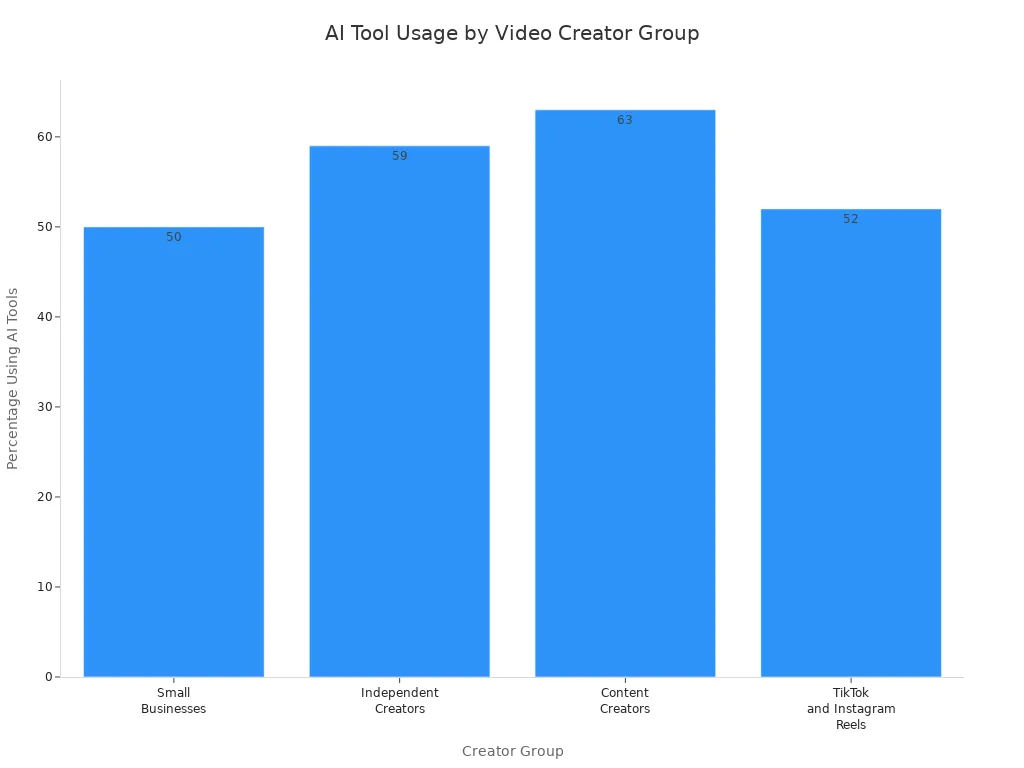
Have you ever wanted to turn your idea into a video but didn’t know how? You are not alone. Now, you can start with an idea to video and utilize AI-powered video tools. These tools help you create videos much faster. More than half of people who make videos are using AI now. This includes small businesses and social media stars. Check out this table to see how many creators are using AI for videos:
Group | Percentage Using AI Tools | Notes |
|---|---|---|
Small Businesses | 50% | Adoption of AI-generated video creation tools |
Independent Creators | 59% | Cost reduction through AI video tools |
Content Creators | 63% | Regular use of AI-assisted scriptwriting |
TikTok and Instagram Reels | 52% | AI-generated short-form video content |
You should know your goal and audience before you begin. With AI, making and sharing videos is easy. You can effortlessly transform your idea into a video without any worries.
AI Video Creation Overview
Are you ready to see how ai video tools can change the way you make videos? You do not need to be a pro to get started. With ai, you can turn your ideas into videos in just a few simple steps. This section will walk you through a step-by-step guide and show you why so many people love using ai video tools for video creation.
Step-by-Step Guide
Let’s break down the process with a hands-on tutorial. You start with your idea. Next, you pick the right ai video tools for your project. These tools help you write scripts, choose visuals, and even add music. You follow each step, and soon you have a finished video. Many creators use a step-by-step guide or a hands-on tutorial to make sure they do not miss anything. You can do the same. Each step is easy to follow, and you can go back if you need to make changes.
Tip: If you want to make lots of videos, ai video tools can help you finish them much faster than doing everything by hand.
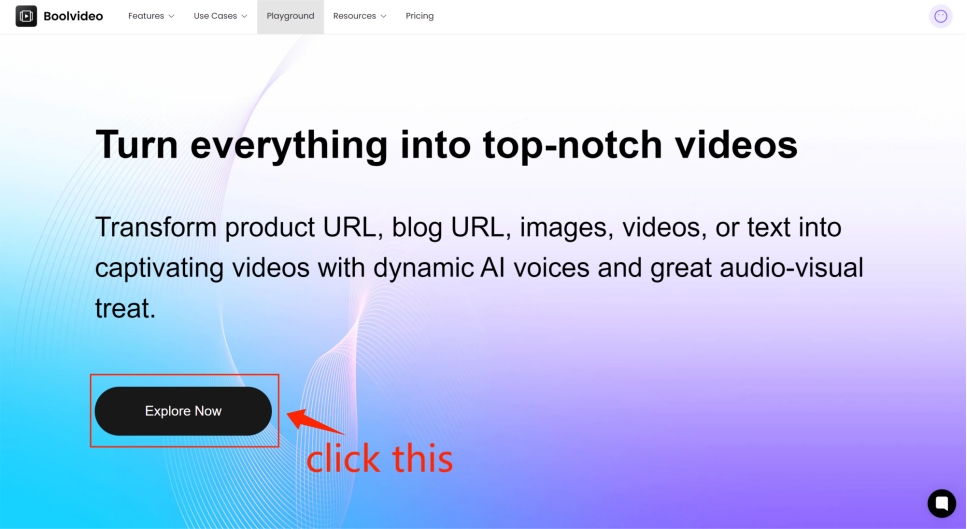
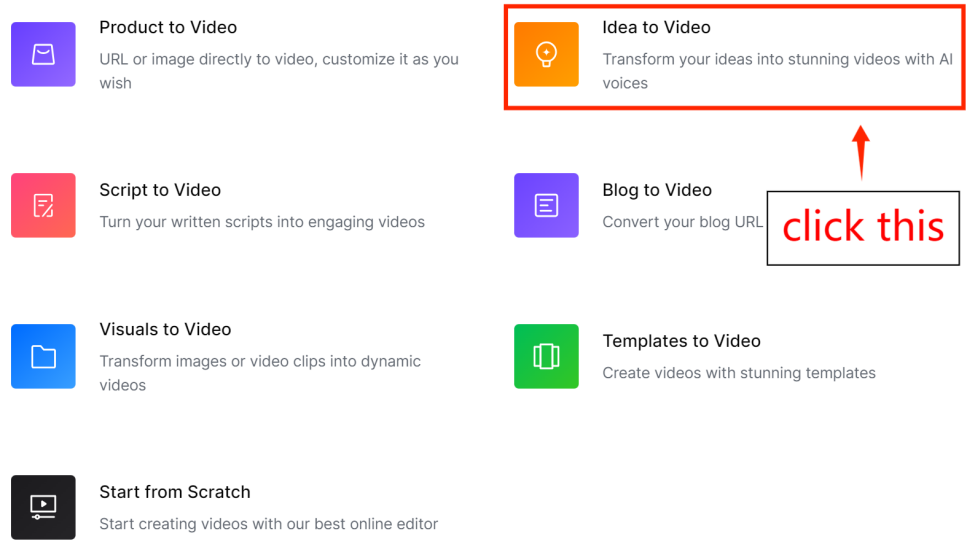
Step1: go to Idea to Video
From the home page click 'Explore Now' to enter the main page, then select 'Idea to Video'.
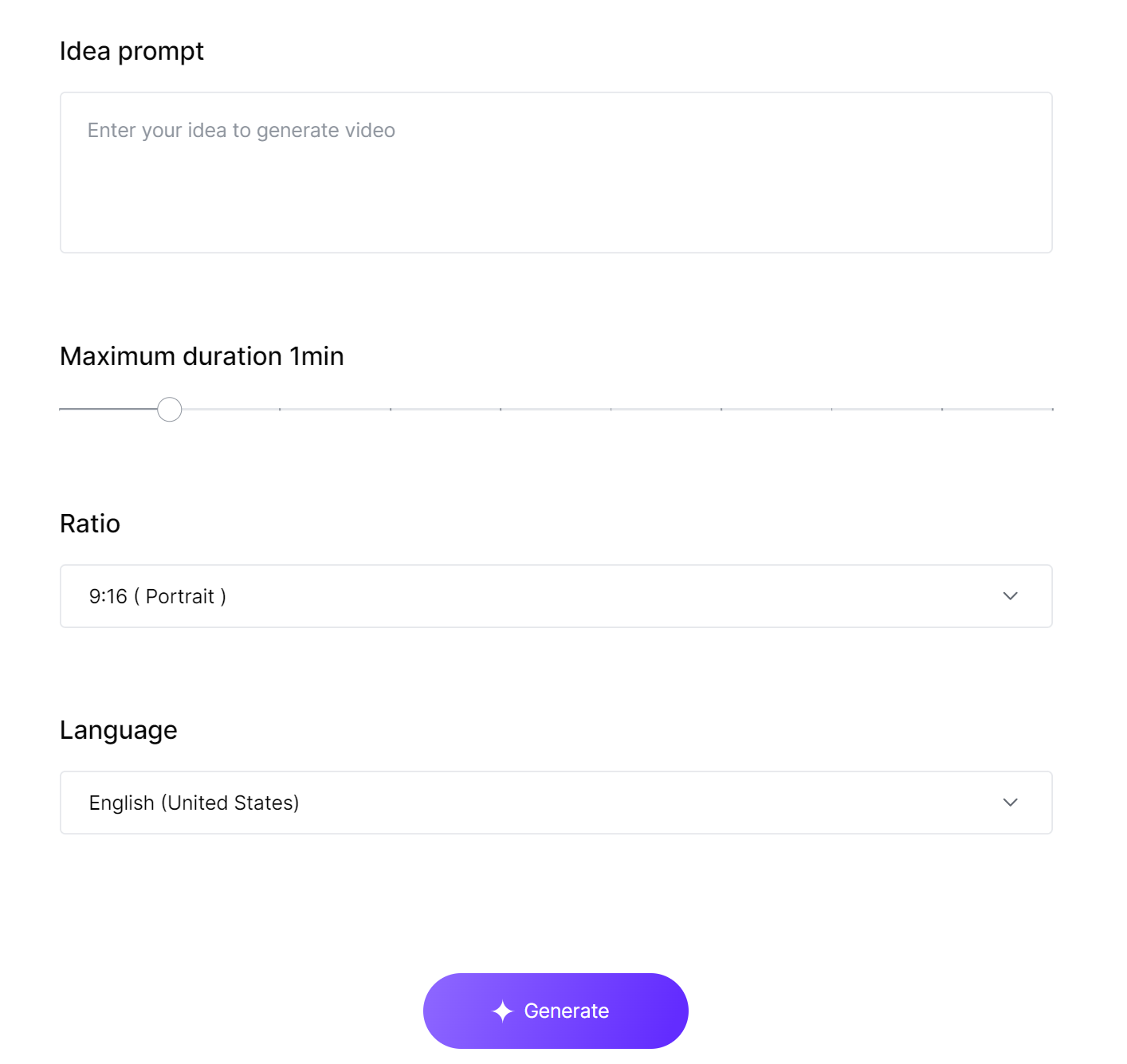
Step2: Input your idea and personalize video properties
According to the prompts, enter your idea, set the video duration, aspect ratio, and language, and then click 'Generate' to create the video.
Step3: Preview and Customize your video
Wait a moment, and the generated clips will be displayed on the Scene editor. You can edit the video, change the language, and choose the video name and resolution upon export. For specific editing tutorials, please refer to our other article: How to edit video in Scene Editor.
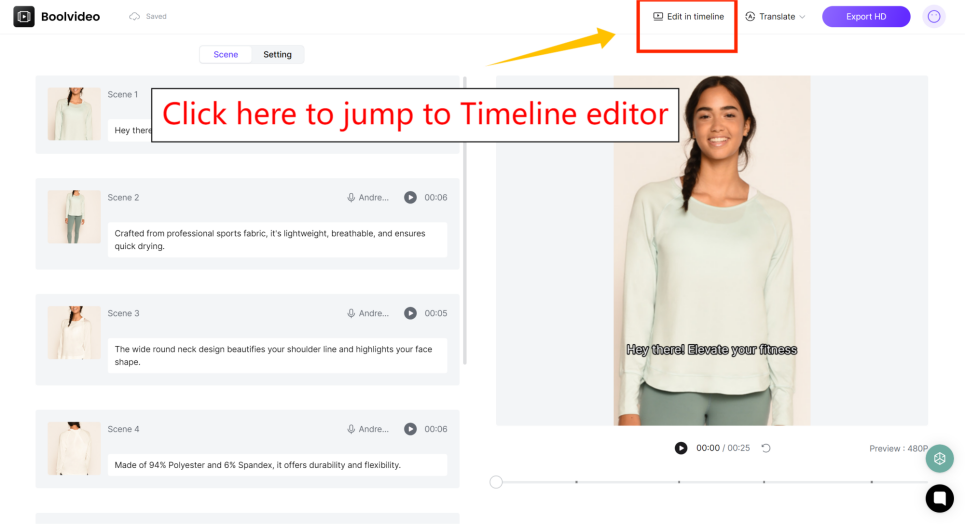
If you are not satisfied with the generated results, you can click 'Edit in timeline' in the top right corner to enter our powerful timeline editor for adjustments. For specific guidance, please refer to our other article:
How to edit videos in Timeline Editor
This post will show you step-by-step how to edit videos in Timeline Editor.
Step 4: Export your video
If you are satisfied with the generated results, you can export them directly.
Idea to Video: Define Goals
Before you jump into making videos with ai, you need to set clear goals. You want your idea to video process to feel smooth and focused. When you know what you want, ai tools can help you reach your target faster. You should always ask yourself, “What do I want my video to do?” Maybe you want to teach, entertain, or promote something. Your purpose shapes every step of your video creation.
Brainstorm Concepts
You have an idea, but you need to grow it. Brainstorming helps you turn a small thought into a big plan. You can use ai to spark new ideas and organize them. Try these techniques to make your idea to video journey easier:
Use online whiteboard tools to draw out your thoughts. Jamboard and Kudoboard let you see your ideas and move them around.
Work with friends or teammates using Google Drive. You can share notes and get feedback, even if you are not in the same room.
Build a story that connects with your audience. Use a classic storytelling framework. Start with a problem, show a solution, and end with a strong message.
Let ai suggest new concepts. Many ai platforms offer prompts and templates to help you brainstorm faster.
Mix and match ideas. Sometimes, combining two simple ideas leads to a unique video.
Tip: If you get stuck, ask ai for help. Many ai tools can generate lists of topics or even write outlines for your videos.
You do not need to be perfect. The goal is to get your ideas out and see which ones fit your video creation plan. The more you brainstorm, the easier it gets to turn your idea to video.
Identify Audience
You want your videos to reach the right people. Knowing your audience helps you make better choices with ai tools. You can use ai to study trends and find out what viewers like. Here are some steps to help you identify your audience:
Create buyer personas. Think about who will watch your video. Write down their age, interests, and problems.
Research your contacts. Look for patterns in your email list or social media followers. Ai can help you spot trends.
Use focus groups. Ask a small group to watch your video and share their thoughts. Ai can collect and sort their feedback.
Check which topics get the most likes and comments. Ai can analyze your content and show you what works.
Talk to your sales or customer service team. They know what questions people ask. Ai can organize this info and help you plan your next idea to video.
Note: When you know your audience, you can use ai to personalize your videos. You can change the style, language, or even the music to match what your viewers enjoy.
Your idea to video process gets easier when you focus on your audience. Ai makes it simple to gather data and adjust your videos. You can test different versions and see which one gets the best response. This way, your video creation always improves.
You have the tools and the plan. Now, you can use ai to turn your idea to video and reach your goals. The right audience and a strong concept make your videos stand out.
Create Videos with AI Tools
You want to create videos with ai, but you might not know where to start. Many people feel the same way. The good news is that you have lots of choices. Today, you can use ai video generators to make amazing videos in just a few clicks. These tools help you with every step of ai-powered video production. You do not need to be an expert. You just need to pick the right ai video maker for your needs.
Select AI Platforms
Let’s look at some popular ai video generators. Each one has special features. Some focus on ai art video, while others help with ai-enhanced video production. Here are a few top choices:
Boolvideo: This ai video maker stands out for its easy-to-use design. You can turn your ideas into ai art video quickly. Boolvideo supports ai-powered video production with smart templates and fast editing.
Synthesia: This platform lets you create videos with ai avatars. You type your script, and the ai video generator brings it to life. Synthesia works well for personalized video and ai art video.
Pictory: Pictory helps you turn text into ai art video. You paste your story, and the ai video maker creates visuals and voiceovers. This tool is great for ai-enhanced video production and video production workflows.
Lumen5: Lumen5 uses ai to match your script with images and music. You can create videos with ai for social media, marketing, or education. Lumen5 supports ai-powered video production and ai art video.
InVideo: InVideo gives you lots of templates. You can make ai art video for YouTube, Instagram, or business. InVideo’s ai video generators help you save time and boost your video production workflows.
Tip: Try out free versions before you decide. Most ai video makers let you test their features. You can see which one fits your style and project.
When you choose an ai video maker, think about your goals. Do you want to make ai art video for fun? Are you planning a personalized video campaign? Maybe you want to speed up your video production process. Each ai video generator has strengths. Some focus on ai video art, while others help with ai-powered video production or ai-enhanced video production.
Here’s a quick table to help you compare:
Platform | Best For | Key Feature | Free Trial? |
|---|---|---|---|
Boolvideo | ai art video, fast edits | Smart templates, easy UI | Yes |
Synthesia | personalized video | AI avatars, voiceovers | Yes |
Pictory | ai text to video generator | Text-to-video, auto visuals | Yes |
Lumen5 | ai video art, social | Script-to-video, music sync | Yes |
InVideo | video production workflows | Templates, quick exports | Yes |
You can see that each ai video maker offers something special. You might want to try more than one. This way, you find the best fit for your ai-powered video production.
Boolvideo Features
Boolvideo makes it easy to create videos with ai. You do not need to worry about editing skills. The platform guides you through the whole video production process. Here’s what you get with Boolvideo:
Smart Templates: You pick a template, and Boolvideo fills in the details. The ai art video engine suggests colors, fonts, and layouts. You get a professional look every time.
Personalization: Boolvideo lets you make personalized video for your audience. You can change names, messages, or even images. This helps you run personalized video campaigns that connect with viewers.
Fast ai-powered video production: You upload your script or idea. The ai video maker turns it into ai art video in minutes. Boolvideo uses ai to match visuals, music, and text.
Easy Video Production Workflows: Boolvideo keeps your projects organized. You can manage your ai-enhanced video production from start to finish. The dashboard shows your progress and helps you stay on track.
AI Video Art and Effects: You can add ai video art, transitions, and effects with one click. The ai video generators suggest styles that fit your story. You do not need to search for assets or music.
Personalization Tools: Boolvideo uses ai to study your audience. The platform helps you pick the best style for each viewer. You can create videos with ai that feel unique and special.
Note: Boolvideo supports both beginners and pros. You can start simple or dive into advanced ai art video features. The platform grows with your skills.
If you want to create videos with ai, Boolvideo gives you everything you need. You can focus on your ideas. The ai video maker handles the hard parts of ai-powered video production. You get more time to be creative and less time worrying about the details.
Many creators use Boolvideo for ai art video and ai video art projects. You can use it for business, school, or fun. The platform supports ai-enhanced video production and helps you build strong video production workflows. You can even use Boolvideo as your main ai video generator for all your projects.
Callout: If you want to try ai art video, Boolvideo is a great place to start. You can make personalized video, test new styles, and see fast results.
You now know how to choose the right ai video generators. You also know how Boolvideo can help you create videos with ai. Start your ai-powered video production journey today. You will see how easy and fun ai art video can be!
Customize with AI Effects

You want your videos to be special. AI helps you add fun effects, smooth scene changes, and cool music. You do not need to spend a long time editing. AI lets you finish your video faster and makes it look professional.
Add Transitions
Transitions move your video from one scene to another. AI can show you the best transitions for your style. You get smart ideas that fit your video’s theme. You can pick templates or let AI do it for you. This saves time and keeps your video looking good.
Here’s a table with top AI ways to add transitions and effects:
Technique/Feature | Description |
|---|---|
AI looks at your video and suggests transitions that fit the mood. | |
Customizable Templates | Pick from ready-made templates for different content types. |
Advanced Editing Tools | Change speed, direction, and length for smooth transitions. |
Preview Effects | Try effects before you choose the ones you want. |
Automation of Complex Tasks | AI picks and adds transitions for you, making editing easy. |
Tip: Watch your transitions before finishing your video. You can test effects and see which ones look best.
Enhance Engagement
You want people to watch your whole video. AI helps you add effects and music that grab attention. When you use AI, you can make viewers feel more excited and interested. Studies show AI effects help keep people watching by making videos more fun.
Here’s a quick table about how AI affects viewer engagement:
Aspect | Details |
|---|---|
Study Focus | Looks at how AI effects change feelings and engagement. |
Methodology | Uses interviews and surveys to check impact. |
Sample Size | |
Key Findings | AI effects help connect feelings to viewer interest. |
Implications for Managers | Shows why AI effects help keep viewers interested. |
You can use AI to add music, sound effects, and moving text. These features make your videos more fun and easy to remember. Try mixing effects to see what your viewers like. You can always change things and try new ideas.
Callout: If you want your videos to stand out, use AI for effects and transitions. Your videos will look great and keep people coming back.
Edit & Refine Video
Editing with ai makes your video production smoother and faster. You want your videos to look sharp and feel professional. AI tools help you fix mistakes, improve scenes, and create high-quality videos without stress. Let’s walk through how you can preview, edit, and check your video before sharing it with the world.
Preview & Edit
You should always preview your video before finishing. AI lets you watch each scene and spot anything that feels slow or out of place. You can change the transcript, cut boring parts, and add new scenes with just a few clicks. Here’s a simple step-by-step guide for video editing with ai:
Edit your video by changing the transcript. This helps you manage scenes and keep your story clear.
Remove filler words in one click. Your video sounds smoother and more professional.
Add transitions, B-roll, and effects to make your video production pop.
Adjust the aspect ratio for Instagram, YouTube, or other platforms. Your videos fit everywhere.
Review your video and cut slow parts. Add scenes if you need more detail.
Get feedback from friends or teammates. Make final changes for the best results.
Tip: AI video editing tools let you test different versions. You can see which style works best for your audience.
Quality Check
You want your creation to stand out. AI helps you check for errors and polish your video production. Look for things like sound quality, clear visuals, and smooth transitions. Many AI platforms offer automatic quality checks. They spot problems and suggest fixes so you can create high-quality videos every time.
Here’s a quick table to help you remember what to check:
What to Check | Why It Matters |
|---|---|
Sound Quality | Keeps viewers engaged |
Visual Clarity | Makes your message clear |
Smooth Transitions | Improves video flow |
Correct Aspect | Fits different platforms |
Note: Always watch your video from start to finish. AI can help, but your eyes catch things a computer might miss.
Editing with ai gives you more control over your video production. You spend less time fixing mistakes and more time creating videos people love. Your video editing process becomes simple, and your creation shines.
Export & Share
Export Options
You finished your video creation journey. Now, you want to export your video and get it ready for sharing. Most ai video production tools make exporting easy. You can choose the best format for your needs. MP4 works well for almost every platform. Some ai platforms let you pick HD or even 4K quality. You just click “Export” and your video gets saved to your computer or cloud.
Here are some quick tips for exporting your videos:
Check the resolution before you export. Higher quality looks better but takes more space.
Pick the right aspect ratio. Square videos work for Instagram. Wide videos fit YouTube.
Use ai production tools to compress your video if you need a smaller file.
Save a backup copy. You never know when you might need to edit your video again.
Tip: If your ai video production tool offers direct uploads, you can send your video straight to social media or YouTube without extra steps.
Sharing Platforms
You want people to see your videos. Sharing is the last step in your video production process. Ai tools help you post your video on many platforms with just a few clicks. You can share on YouTube, Instagram, Facebook, TikTok, or even your own website.
Here’s a table to help you pick the best platform for your video:
Platform | Best For | Special Features |
|---|---|---|
YouTube | Long videos | HD, playlists, analytics |
Short videos, reels | Stories, hashtags | |
TikTok | Fun, quick videos | Effects, trends |
All types | Groups, sharing | |
Website | Custom videos | Branding, control |
You want your video to reach the right audience. Use ai production tools to add hashtags, titles, and descriptions. This helps more people find your videos. Try posting at different times to see when your audience watches most. Ask viewers to like, comment, and share. This boosts your video and helps your creation get noticed.
Note: Always check your video after posting. Ai analytics show you how your video performs. You can learn what works and improve your next video production.
You have learned how to turn your idea into a video using ai tools. Try out platforms like Boolvideo and see how easy video creation can be. Start making videos today and share your story with the world. New trends are changing how you create videos:
AI helps you come up with fresh ideas and edit videos in real time.
You can make interactive videos and reach more people.
AI video creation is now open to everyone.
The future of videos looks bright. Jump in and explore new ways to create.
FAQ
How do I start making a video with ai tools?
You pick an idea and choose an ai platform. The tool guides you step by step. You add your script, visuals, and voice. You finish your video quickly, even if you have never made one before.
Can I use ai if I have no editing experience?
Yes! You do not need special skills. Ai platforms offer templates and smart suggestions. You just follow the prompts. You get a professional result without learning complicated software.
What devices work best for ai video creation?
You can use a laptop, desktop, or even a tablet. Most ai platforms run in your browser. You do not need expensive hardware. You just need a stable internet connection.
How long does it take to make a video with ai?
You can finish a short video in less than an hour. Ai speeds up every step. You spend less time editing and more time sharing your ideas.
Can I share my ai video on social media?
Yes! Ai platforms let you export your video in the right format. You upload it to YouTube, Instagram, or TikTok. You reach your audience fast.
See Also
Transform Your Videos into Animations Using AI Technology
Harness AI Tools to Craft Innovative Video Scripts
Utilize AI to Create Captivating Videos from Text
Accelerate your video production
10X with Boolvideo