How to Turn Your Ideas into Engaging YouTube Videos with Winning Thumbnails

Turning your idea to video can feel easy when you know the right steps. You don’t need fancy gear or years of video marketing experience. You just need a good thumbnail to catch attention and help viewers choose your video. Did you know 75% of viewers say the youtube thumbnail makes them click? Custom thumbnails appear in 90% of top videos, and a good thumbnail can boost click-through rates by up to 30%. The video thumbnail is your first chance to grab attention. With Boolvideo, you can design a youtube thumbnail that makes your videos stand out. When you use a video thumbnail that pops, you help your video get noticed. Good thumbnail choices make viewers stop scrolling and pay attention. If you want your video marketing to work, focus on the video thumbnail. The right youtube thumbnail can turn your idea to video into something viewers can’t ignore.
Evidence Description | Percentage |
Custom thumbnails in top-performing videos | 90% |
Increase in click-through rate due to compelling thumbnails | 3-6% |
Higher click-through rates for videos with custom thumbnails | 60-70% |
75% of viewers say the youtube thumbnail matters most.
60% of creators spend more time on thumbnail than video content.
Personalized video thumbnail can boost CTR by 30%.
65% of viewers pick a video based on the thumbnail.
Idea to Video
Brainstorming Ideas
You want your idea to video to stand out. Start by thinking about your channel’s niche and the viewers you want to reach. Ask yourself what makes your videos unique. Look for trending topics on Google Trends, YouTube Analytics, or social media platforms like TikTok and Reddit. These tools help you spot what’s hot right now. Try brainstorming alone or with friends. Sometimes, a team sparks new ideas you might miss. Use idea generators to come up with fresh video concepts and catchy youtube thumbnail titles. Study successful videos in your niche. Remix their best parts, but add your own twist. Listen to your audience. Their comments and feedback can guide your next video thumbnail design.
Tip: Videos that are easy to follow keep viewers interested. Clarity matters, so plan your video content with simple steps.
Identify your audience and niche.
Find trending topics.
Brainstorm with others.
Use idea tools.
Analyze top videos.
Listen to feedback.
Validating Topics
Before you jump from idea to video, make sure your topic will attract viewers. Use Subscribr’s Research Assistant to gather info about your video. Try Subscribr’s Niche & Video Ideation to see what works in your area. Poll your audience with YouTube polls or ask on social media. Join online communities and forums to learn what viewers want. Check YouTube Search and Google Trends to see if people are searching for your topic.
Polls and social media show what your audience likes.
Forums and groups reveal viewer needs.
YouTube Search and Google Trends track demand.
Audience research helps you pick topics that match viewer interests. When you align your video with what viewers want, you boost engagement and growth.
Planning Content
Planning turns your idea to video into something viewers love. Start with a strong hook in the first 5-10 seconds. This grabs attention and makes your youtube thumbnail more effective. Structure your video with a clear beginning, middle, and end. Use storytelling to keep viewers watching. Split your video into short sections, three to five minutes each, so viewers get mental breaks. Add calls to action at natural points.
Note: Consistency helps viewers know when to expect new videos. Plan your posting schedule and stick to it.
Create a captivating introduction.
Structure your video for flow.
Use stories to engage.
Break content into short sections.
Add calls to action.
Post videos regularly.
Many creators struggle to move from idea to video. You can overcome this by keeping a content diary, using digital tools, and planning with a calendar. Good time management lets you balance filming, editing, and engaging with viewers. When you plan your video thumbnail and youtube thumbnail, you make your videos easier to find and more likely to get clicks.
How to transform idea into videos?
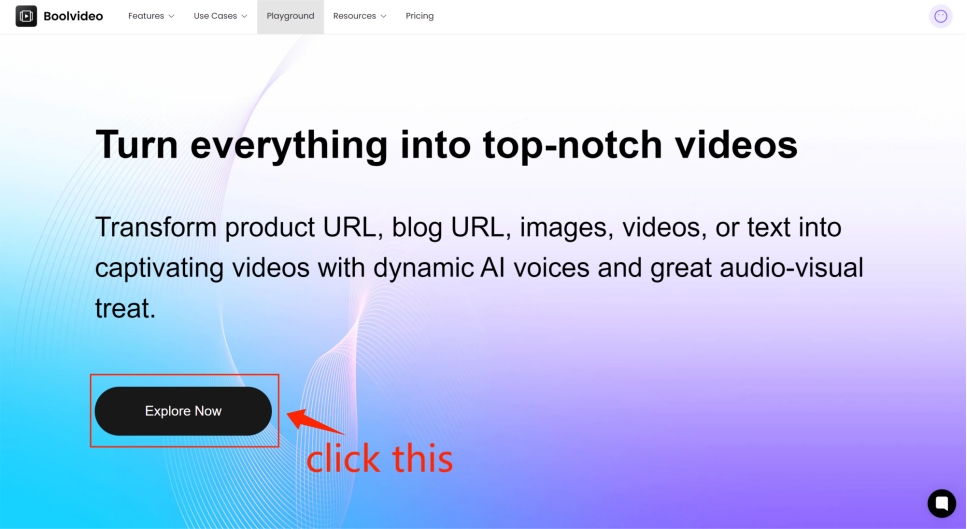
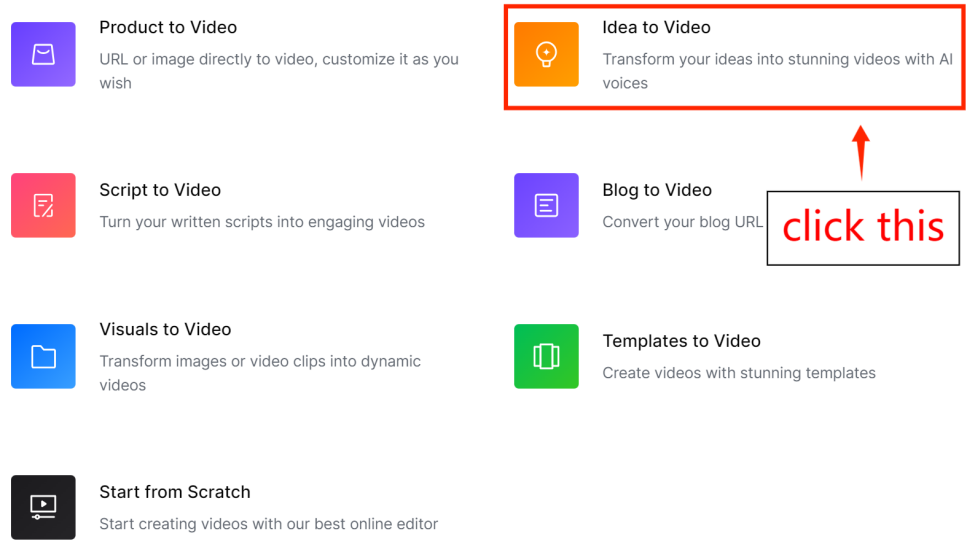
Step1: go to Idea to Video
From the home page click 'Explore Now' to enter the main page, then select 'Idea to Video'.
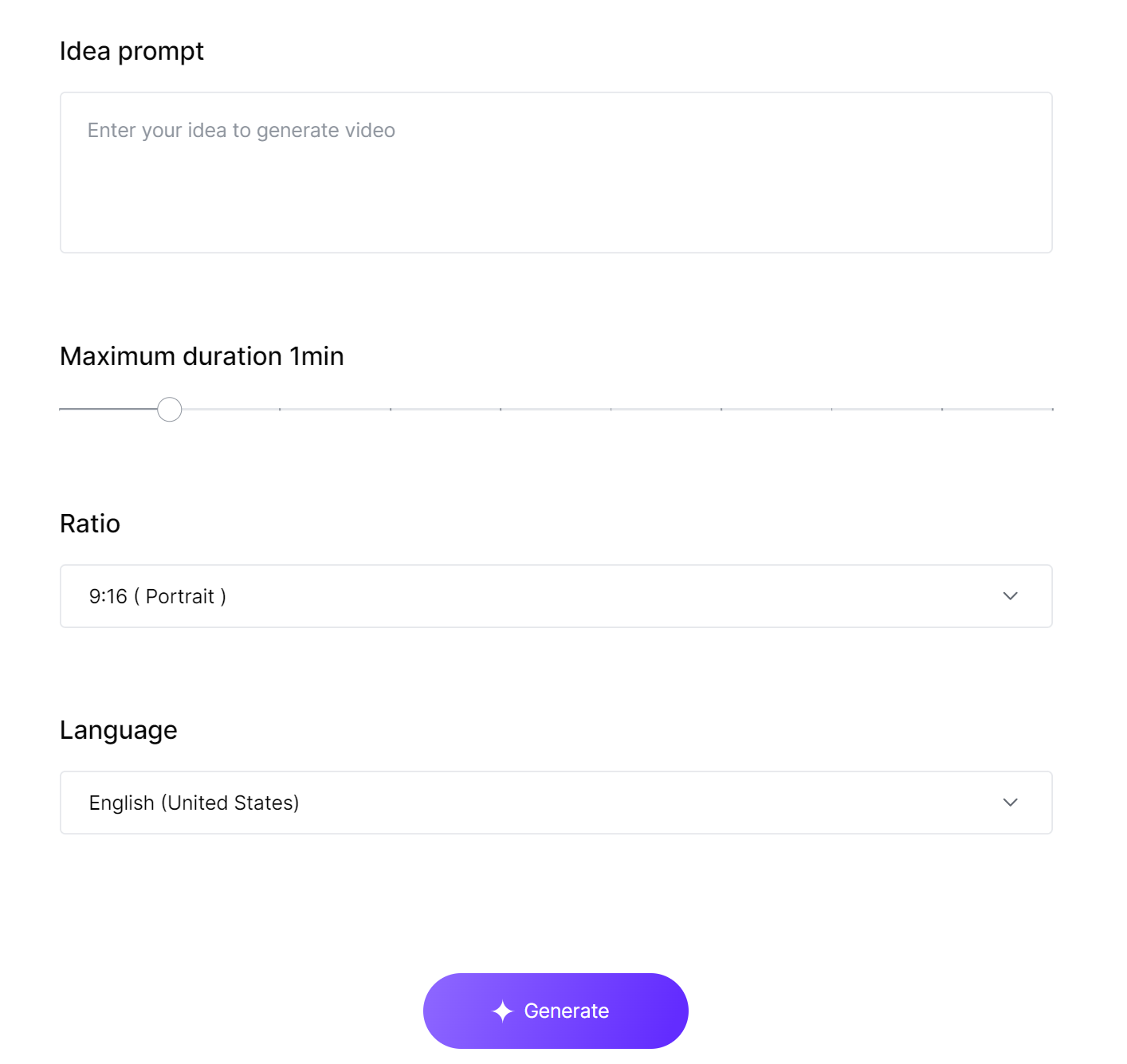
Step2: Input your idea and personalize video properties
According to the prompts, enter your idea, set the video duration, aspect ratio, and language, and then click 'Generate' to create the video.
Step3: Preview and Customize your video
Wait a moment, and the generated clips will be displayed on the Scene editor. You can edit the video, change the language, and choose the video name and resolution upon export. For specific editing tutorials, please refer to our other article: How to edit video in Scene Editor.
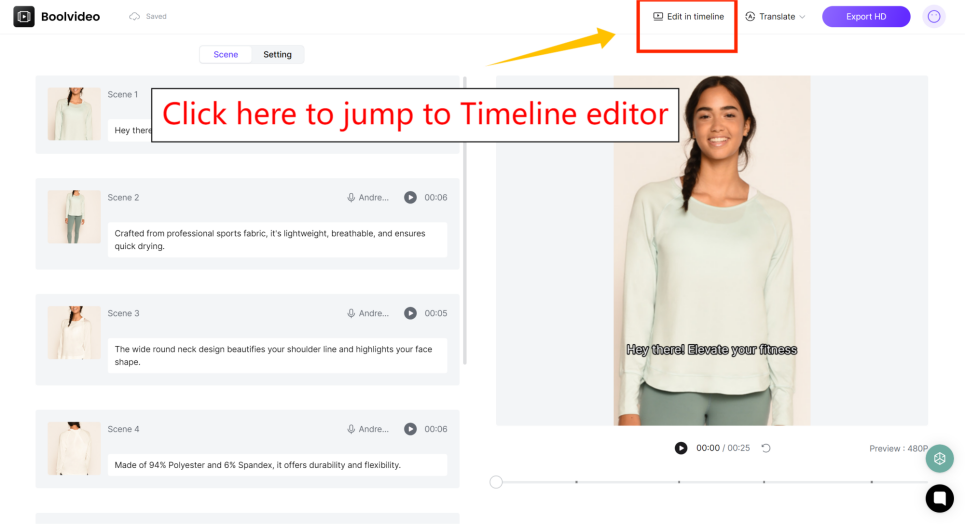
If you are not satisfied with the generated results, you can click 'Edit in timeline' in the top right corner to enter our powerful timeline editor for adjustments. For specific guidance, please refer to our other article:
How to edit videos in Timeline Editor
This post will show you step-by-step how to edit videos in Timeline Editor.
Step 4: Export your video
If you are satisfied with the generated results, you can export them directly.
Video Creation
Scripting
You want people to watch your video right away. Start with a simple story. Use easy words and short sentences. This helps everyone understand. Try to add jokes or pictures to make it fun. Always ask viewers to like, comment, or subscribe at the end. This makes them want to see more videos. It is important to look confident on camera. Practice talking with excitement and change your voice sometimes. When you write your script, give enough details but keep it short. Use words like “for example” or “next” to help people follow along. Here are some ways to make your script better:
Technique | Description |
|---|---|
Narrative Development | Keep your story simple and clear. Add jokes or pictures for better visual storytelling. |
Call to Action | Finish by asking for likes, comments, or subscriptions. |
On-Screen Presence | Talk with excitement and look confident. |
Voice Modulation | Change how you talk to keep people interested. |
Community Engagement | Reply to comments and talk with your viewers. |
Filming Tips
You want your video to look and sound good. Start by making a plan. Draw a storyboard and write down your gear. Know who you want to watch your video. Use a good microphone so people can hear you well. Test your equipment before filming. Do not use too many special effects. Too many effects can take away from your message. Use good lighting. Three-point lighting works well inside. Outside, use reflectors to make faces brighter. Here are some mistakes and how to fix them:
Not planning before filming—always plan your shots and gear.
Forgetting your audience—know who you want to reach.
Bad sound—use a good microphone.
Too many effects—keep it simple.
Not enough light—use three-point lighting or reflectors.
Editing for Engagement
Editing makes your video fun to watch. Use feelings like happy memories or new things to connect with viewers. Add quick cuts or graphics to keep it exciting. Put captions on your video so everyone can follow. Do not show the end of your video too soon. This keeps people watching longer. Make playlists so people can watch more videos in a row. Pacing is important. Fast cuts make things exciting. Slow parts help people understand big ideas. Use smooth changes between scenes for better visual storytelling. Try jump cuts or speed changes to make your video thumbnail and content more interesting. Videos that change every two seconds keep people’s attention. If you want to save time, use Boolvideo. Its tools and templates make editing fast and easy. You can make a video thumbnail and edit your video in just a few minutes.
Tip: A great thumbnail and video thumbnail help more people see your video. Plan your thumbnail while editing for the best results.
YouTube Thumbnail Essentials
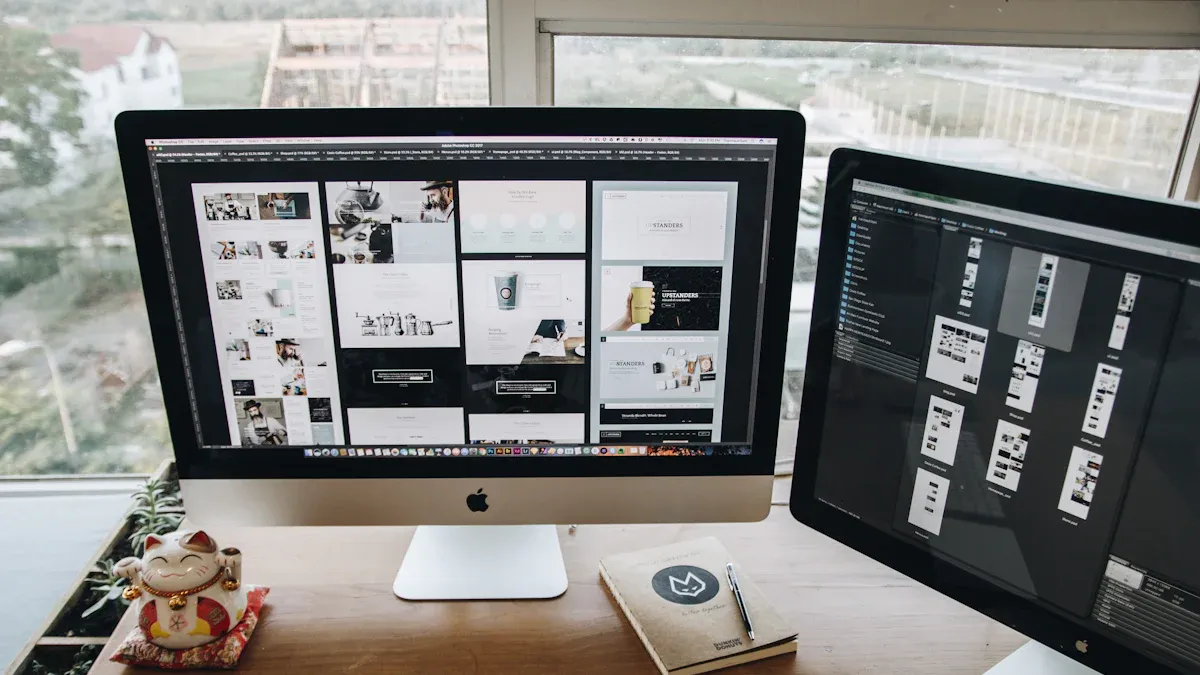
Why Thumbnails Matter
You see a thumbnail before you watch any video. That small image grabs your attention and helps you decide if you want to click. When you make a thumbnail, you set the first impression for your viewers. Research shows that the visual qualities of a thumbnail can change how many people watch your video. If you use a good thumbnail, you can boost your video’s performance and get more clicks.
Thumbnails work as the first handshake between you and your audience. They set expectations and spark curiosity. Emotionally engaging thumbnails can make viewers feel excited or curious, which leads to higher click-through rates. If your thumbnail matches your video content, viewers feel satisfied and stay longer. This reduces bounce rates and helps your channel grow.
Thumbnails and titles grab attention and influence emotions.
Eye-catching designs in thumbnails increase viewer engagement.
Thumbnails with strong emotional appeal can make viewers want to watch your videos right away.
When you use a vibrant thumbnail design, you make your video stand out in a crowded feed. Bright colors and expressive faces in your thumbnail can increase click-through rates by up to 20%. If you add strong emotions, you can boost that rate by another 25%. People are drawn to faces and colors, so use them to make your video thumbnail pop.
Elements of a Great Thumbnail
You want your youtube thumbnail to be clear and easy to understand. The main subject or image should be front and center. If you show a face or a product, make it big and noticeable. Use large, bold, and noticeable text—five words or less works best. This is called impactful text. It helps viewers know what your video is about in seconds.
Here are some video thumbnail best practices:
Show the main subject clearly.
Use big, bold, and noticeable text.
Pick bright colors for color contrast.
Add expressive faces for emotional appeal.
Keep your thumbnail simple and uncluttered.
Tip: Bright colors like red, yellow, and blue catch attention fast. Use color contrast to make your thumbnail stand out.
A good thumbnail uses color contrast to separate the main subject from the background. This makes your video thumbnail easy to spot. If you want to make a thumbnail that gets clicks, focus on emotional appeal. Show excitement, surprise, or happiness on faces. Research shows that expressive faces and vibrant colors create emotional connections and make your thumbnail more visible.
Here’s a quick table to help you remember the best practices for a good thumbnail:
Element | Why It Matters |
|---|---|
Main Subject | Focuses attention on your video’s topic |
Noticeable Text | Tells viewers what to expect |
Color Contrast | Makes your thumbnail pop |
Expressive Faces | Builds emotional connection |
Simplicity | Keeps your thumbnail easy to understand |
If you want your youtube thumbnail to perform well, always use these best practices. A good thumbnail can boost your click-through rate and help your videos reach more viewers.
Video Thumbnail Branding
Branding makes your channel look professional and helps viewers recognize your videos. When you use consistent branding in your video thumbnail, you build trust and make your channel easy to spot. Good thumbnail branding means you use the same colors, fonts, and logo every time.
Here are some best practices for branding your youtube thumbnail:
Follow your channel’s brand guidelines for colors, fonts, and logos.
Create reusable thumbnail templates with your brand elements.
Use a signature color palette for color contrast.
Pick a few fonts and stick with them for noticeable text.
Keep your imagery and icons in the same style.
Place your logo in the same spot on every thumbnail.
Use a standard layout for text and images.
Note: Consistent branding helps viewers find your videos quickly. When you make a thumbnail with the same style, your channel becomes more memorable.
If you use the same font, color palette, logo placement, and layout style across all your thumbnails, you create a recognizable look. This makes your content instantly stand out. Over time, viewers will spot your videos at a glance. This builds a strong brand and supports long-term growth.
Creators who keep their branding consistent build stronger connections with their audience. Your viewers will know what to expect from your videos. Once people start recognizing your youtube thumbnail, you lay the foundation for success.
A good thumbnail with consistent branding helps your channel grow. It makes your videos easy to find and builds trust with your viewers. If you want to make a thumbnail that gets noticed, always follow these video thumbnail best practices.
Designing Stunning AI Thumbnails

Tools and Methods
You want your youtube thumbnail to stand out and get more clicks. AI thumbnail generators help you make a thumbnail quickly and easily. These tools save time and let you be creative. You can change colors and fonts to match your brand style. Many creators use these tools because they are not expensive. Here is a table with some popular tools for making ai thumbnails:
Tool Name | Key Features | Pricing |
|---|---|---|
Thumbler AI | Fast thumbnail making, branding options | Starts at $12/month |
Team-GPT | Works with teams using many AI models | Starts at $25/user/month |
Simplified | Design tool with branding templates | Free plan; paid from $19/month |
Test My Thumbnails | Tests thumbnails to see which works best | Starts at $8/month |
AKOOL | Makes high-quality images, does many at once | Paid plans from $30/month |
vidIQ | Gives analytics and makes AI thumbnails | Free tier; paid from $17/month |
VEED.io | Edits videos and makes thumbnails | Free tier; paid from $13/month |
AI thumbnail generators help you make eye-catching images. You can add your logo, colors, and fonts for a custom look. AI can check what viewers like and suggest a good thumbnail for your video.
Using Boolvideo
Boolvideo makes it easy to create a youtube thumbnail that gets noticed. You can use AI to make a thumbnail from pictures, words, or a video link. Boolvideo gives you AI voices and cool effects for your videos. You get clear, high-quality images and save money with these tools. Boolvideo helps you make a custom thumbnail that matches your brand. You can keep your youtube thumbnail style the same every time. Boolvideo’s AI tools let you design a good thumbnail in just a few minutes.
Feature | Description |
|---|---|
AI Video Creation | Make fun videos from links, pictures, and words. |
Dynamic AI Voices | Add voices to make your video more exciting. |
Stunning Audio-Visual Effects | Use effects to make your videos and thumbnails stand out. |
A/B Testing Thumbnails
You want to find out which youtube thumbnail works better. A/B testing lets you compare two custom thumbnail designs. Change only one thing, like the thumbnail, and upload it in YouTube Studio. Wait five days and look at your analytics to see which gets more clicks. A good thumbnail can raise your CTR by 20-30%. Some tests saw a 25% higher CTR with a simple design. One test showed a 95% better average CTR after using ai thumbnails. AI thumbnail generators help you test and see what works. Use YouTube Analytics to check which video thumbnail gets more views. When you find a good thumbnail, use those ideas for your next videos. You can make a thumbnail that makes people want to watch again.
Tip: Always test your youtube thumbnail ideas. The best video thumbnail can help your channel grow faster.
You started with an idea and turned it into a video that grabs attention. Every video needs a thumbnail that makes viewers want to click. When you plan your video, script it, and edit for engagement, you set the stage for a strong thumbnail. A thumbnail with emotional appeal, facts, and clear value draws viewers in. Custom thumbnails can boost your video’s click-through rate by 43%. Consistent branding in your thumbnail helps viewers recognize your videos. Testing and optimizing your thumbnail increases video views. Here’s a quick table of key takeaways:
Key Takeaway | Description |
|---|---|
Consistent Branding | Your thumbnail style makes your video look professional. |
Testing Thumbnails | Try new thumbnail ideas to get more video clicks. |
Viewer Psychology | Design your thumbnail to match what viewers want to see. |
Use Boolvideo to create a thumbnail that stands out. When you focus on your video and thumbnail, you help viewers find your videos and keep their attention. Start making your next video and thumbnail today!
FAQ
How do you pick the best idea for your YouTube video?
Start with topics you enjoy. Check what’s trending on YouTube and social media. Ask your viewers for suggestions. If you see lots of interest, you know you picked a winner.
What size should your YouTube thumbnail be?
Dimension | Recommendation |
|---|---|
1280x720 | Best for clarity |
JPG/PNG | Use for quality |
Under 2MB | Fast loading |
Can you use AI tools for thumbnail design if you’re a beginner?
Absolutely! AI tools like Boolvideo make thumbnail design easy. You just upload your image or type your idea. The tool gives you options. You pick what looks best. No design skills needed.
How do you know if your thumbnail works?
Check your click-through rate (CTR) in YouTube Analytics.
Try A/B testing with two thumbnails.
Ask friends which one grabs their attention.
If your views go up, your thumbnail works!
See Also
Effortless Techniques for Creating Captivating Short Videos
Tips for Making Impactful TikTok Product Videos in 2025
Ultimate Resource for YouTube Thumbnail Sizes in 2024
Creating Marketing Videos That Deliver Tangible Results
Become Proficient in Video Creation from Concept to Completion
Accelerate your video production
10X with Boolvideo