How to Make a News Video Using AI in 2025

Yes, you can easily make a news video with ai in 2025. You do not need advanced skills or experience. Many people now use ai to create news videos, and about 38% of news sites already use these tools instead of traditional methods. With the right steps, you will see how-to-create-a-news-video-with-ai without stress. Ai tools can handle everything from scripting to editing, saving you time and effort. You get more control over news style, language, and audience. Some tools, like Boolvideo, even add a personal touch to your news.
Many beginners face a few bumps:
Free ai video tools often limit news video length, so you may need extra steps for longer stories.
Some ai avatars in news videos look robotic, which can lower viewer interest.
Learning the best way to prompt ai tools for quality news videos takes practice.
With the right tools and steps, you can overcome these common issues and create news videos that stand out.
How to create a news video with ai
Choose Topic
You want people to notice your news video. The first thing to do in how-to-create-a-news-video-with-ai is to pick a topic that is important now. AI news aggregators help you with this step. These tools search the internet for stories that are popular. You can use them to see what people talk about most. It could be breaking news, tech updates, or viral stories.
Here’s a quick look at some of the best AI-powered news aggregators in 2025:
News Aggregator | Key AI Features | Effectiveness for Trending News Identification |
|---|---|---|
Socialwalls | Real-time updates, analytics, interactive polls | Curates engaging, trending news feeds |
Tagbox | Instant updates, AI analytics, filters | Highlights trending topics fast |
Tagembed | Real-time updates, responsive widgets | Surfaces trending news quickly |
Digg | AI curation, user voting | Promotes viral and trending content |
Feedly | Personalized streams, AI filtering | Finds trending news efficiently |
Google News | AI personalization, RSS access | Delivers relevant, trending news |
AI-curated insights, social features | Highlights popular news stories | |
Apple News | Personalized feeds, AI recommendations | Shows trending news for you |
News360 | Personalized curation, audio briefings | Delivers news based on your interests |
AI-curated content, save-for-later | Helps you discover trending stories | |
AI-assisted updates, community voting | Finds viral topics through engagement |
AI tools like these help you find the hottest news topics fast. You can type in your interests or let the tool show you what is trending. This way, you always know about stories that can make your news video special.
Tip: Try using more than one AI news aggregator. You will see more trending stories and can compare which ones are most popular.
Select Format
After you pick your news topic, you need to choose how your news video will look. This is an important part of how-to-create-a-news-video-with-ai. The format you pick depends on where you want to post your video and who will watch it. AI video creation tools let you pick from different templates, aspect ratios, and styles. You can also set the language and make the video fit your audience.
Here’s a table to help you choose the best format for your news video:
Platform | Popular Video Formats | Aspect Ratios Supported | Recommended Resolution(s) | Frame Rate(s) | Notes |
|---|---|---|---|---|---|
TikTok, Instagram Stories | MP4, MOV (H.264) | Vertical (9:16) | 1080x1920 | 30-60 fps | Vertical videos work best for mobile viewers. |
Instagram Feed, Facebook | MP4, MOV (H.264) | Square (1:1), Vertical (9:16), Horizontal (16:9), 4:5, 2:3 | 1080x1080 (square), 1080x1920 (vertical), 1280x720 (horizontal) | 30 fps | Square and vertical videos get more engagement on feeds. |
YouTube, LinkedIn | MP4, MOV (H.264) | Horizontal (16:9) | 1920x1080 (1080p) or higher | 24-30 fps (common), up to 60 fps for fast motion | Horizontal videos look professional and work for longer news stories. |
MP4, MOV (H.264) | 16:9, 1:1, 9:16 | Up to 1920x1200 | 30 or 60 fps | Twitter supports short news videos with flexible formats. |
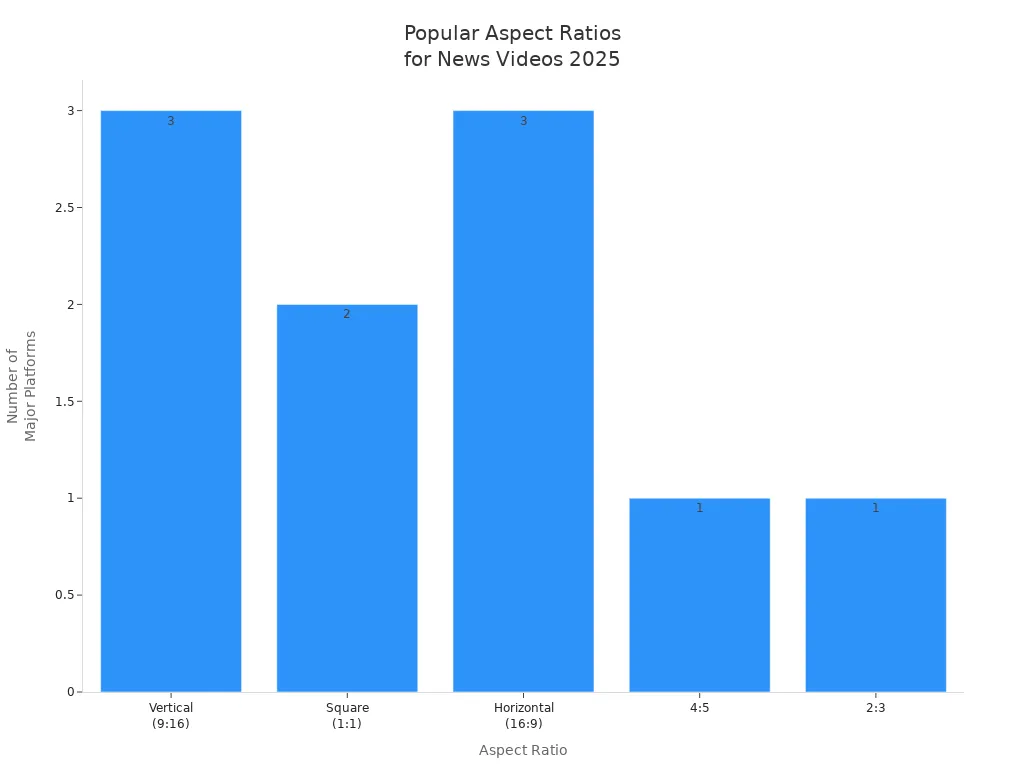
When you use AI video tools, you can pick the right template and aspect ratio with just a few clicks. These tools often tell you the best format for your platform. For example, if you want to make a video for TikTok, the tool will suggest a vertical 9:16 format. If you want to post on YouTube, you will get a horizontal 16:9 template.
You can also set the language and make your news video fit your audience. AI video creation tools look at what your viewers like and suggest the best way to show your news. They can:
Change the script and pictures to match your audience’s interests.
Switch the language or add subtitles for different places.
Pick images and video clips that your viewers will like.
Use AI voiceovers that sound real and interesting.
Personalization makes your news video feel special. AI tools check what your audience likes and help you make a video just for them. This helps your viewers stay interested and want to watch more.
Here are the main steps you’ll follow in how-to-create-a-news-video-with-ai:
Set up your AI tools and accounts, like voiceover and scriptwriting tools.
Use AI news aggregators to find trending news topics.
Choose your video format, template, and platform.
Personalize your news video with language, visuals, and voiceovers.
Make a video using AI video creation tools.
Check and edit your video for quality.
Post your news video on your chosen platform.
With these steps, you can use AI to make a news video that looks professional and connects with your audience. AI video creation makes everything faster and easier, even if you are new to this.
AI Scriptwriting

Generate Script
You do not have to look at a blank page now. With ai, you can start making news scripts fast. Many ai video tools have ai script assistant features. These tools help you turn your ideas into a script for your ai video. You just type in your topic, and the ai script assistant gives you a draft. Some of the best ai video tools for scriptwriting in 2025 are Invideo AI, DeepBrain AI, and Aeon.
Aeon is great for news video production. It lets you turn text, audio, or old articles into a new ai-generated video script. You can use Aeon’s text to video feature to make news stories quickly. This saves you time and helps you make more videos without extra work.
Here’s a quick look at top ai scriptwriting tools for news videos:
AI Scriptwriting Tool | Key Features and Use Cases | Relevance to News Video Production |
|---|---|---|
ScriptBook | Predicts script performance using AI-driven feedback; used by Hollywood studios for market alignment | Helps evaluate scripts for audience engagement and trends |
ChatGPT for Scriptwriting | Generates full scenes and dialogues quickly; supports collaborative writing and story refinement | Enables fast script generation and iterative editing |
Sudowrite | Assists creative writing processes | Supports creative news content |
Jasper AI | Supports marketing and digital content creation | Helps with digital news scripts |
Plotagon | Combines AI scriptwriting with instant animation; visualizes scripts in real-time | Useful for creating animated news segments |
You can try different ai video tools to see which one works best for you.
Edit Script
After you make your script, you should always check it. Ai-generated video scripts are fast, but they are not perfect. You need to check for facts, clear details, and good flow. Editing is important because ai sometimes misses jokes or feelings. You want your news video to feel real and connect with viewers.
Tip: Always read your script out loud. This helps you find mistakes and see if the story sounds natural.
Here are some things to remember about ai-generated video scripts:
Sometimes, ai scripts miss jokes or feelings.
Ai-generated content can have mistakes or strange words.
You need to edit and check every script for facts.
Human creativity makes your ai video special.
Editing with ai video tools like Invideo AI or DeepBrain AI makes editing easier. You can use built-in editing features to fix your script before you move on. This way, your ai video will look professional and people will trust it.
Boolvideo
If you want to make a news video fast, try Boolvideo. You do not need editing skills to use it. This tool does most of the work for you. You only need to give it your script, a product link, or some ideas. Boolvideo quickly turns what you give it into a finished video.
Here are some things that make Boolvideo special:
It can write scripts for you. You can choose the tone and style for your news video.
The ai video maker edits your video with smooth changes, effects, and music in the background.
You get a big library of stock footage and music. You do not have to worry about copyright problems.
The interface is easy to use. Anyone can use this ai video maker, even if you have never made a video before.
Boolvideo saves you time. It does boring editing jobs so you can focus on your story.
You can make good videos fast, which is great for news updates.
Let’s look at some features in a table:
Feature Category | Description |
|---|---|
Content Transformation | Changes product URLs, scripts, images, blogs, and ideas into good videos fast. |
AI-Powered Customization | Has AI scriptwriting, voiceovers, music, effects, and editing that is automatic. |
User Interface | Easy for everyone to use with clear steps and help. |
Multi-Platform Compatibility | Works well for social media, online stores, and personal projects. |
Media Library | Has a big stock footage and music library so you do not need to search outside or worry about copyright. |
Automation | Does boring editing jobs so you can make videos fast without needing to be an expert. |
Use Cases | Good for online store ads, social media, school videos, and business or personal use. |
Distinction from Competitors | Can change and customize more types of content than other tools that only do one thing. |
Boolvideo is different because it does every step for you. The ai video maker looks at what you give it, writes a script, picks music, adds effects, and edits everything together. You get a finished video that looks good and fits what you need. You can use Boolvideo for news, ads, or even school work. If you want to make a video that stands out, this ai video maker makes it simple.
Tip: Try Boolvideo’s templates for different platforms. You can make your news video look good on TikTok, YouTube, or Instagram without extra work.
News Video Creation

Making a news video with AI in 2025 feels amazing. You can turn your ideas into a finished story fast. Here are the main steps in the ai video creation process.
Add Media
First, you add media to your news video. AI video generators make this step simple. You can use tools like Boolvideo, Veo 3, or Vidnoz. These tools help you find video clips, images, or animations. You can search for stock footage or upload your own photos. Some tools let you use AI to make new visuals from nothing. You can even type a description and get a matching video clip.
Here is a table of the most popular ai video generators for news in 2025:
AI Video Generator | Key Features Relevant to News Videos | Suitability for News Media in 2025 |
|---|---|---|
Synthesia | Professional AI avatars, multilingual support (140+ languages), easy script-to-video creation, integration with business tools | Frequently used by editorial teams for professional avatar videos and multilingual content creation |
HeyGen | Customizable templates, API automation, multilingual voiceovers, brand consistency | Recommended for publishers and media companies to create custom visuals and unique storytelling for news and social media content |
Runway Gen-3 | Advanced video editing (text-to-video, image-to-video), motion brush, keyframes, camera controls, inpainting | Enhances news stories with generated visuals; suitable for editorial teams needing advanced video generation capabilities |
You can use more than one ai video generator for your project. For example, use Runway Gen-3 for editing and Synthesia for a news anchor avatar. Mixing tools helps your news video stand out.
AI tools save you a lot of time. Before, you spent hours finding clips or editing. Now, you can finish the same work in minutes. Look at this table to see how much time you can save with ai video creation:
Scenario/Organization | Traditional Time Required | Time with AI Tools | Approximate Time Saved |
|---|---|---|---|
vidBoard video production | 4 hours | 20 minutes | |
Real estate property tours | 3+ hours | 30-40 minutes | ~80% |
Training videos (Synthesia) | 13 days | 5 days | 62% |
Mondelez translations | 100 hours | 10 minutes | 99.8% |
Modern Canada video delivery | Traditional timeline | 90% faster delivery | 90% |
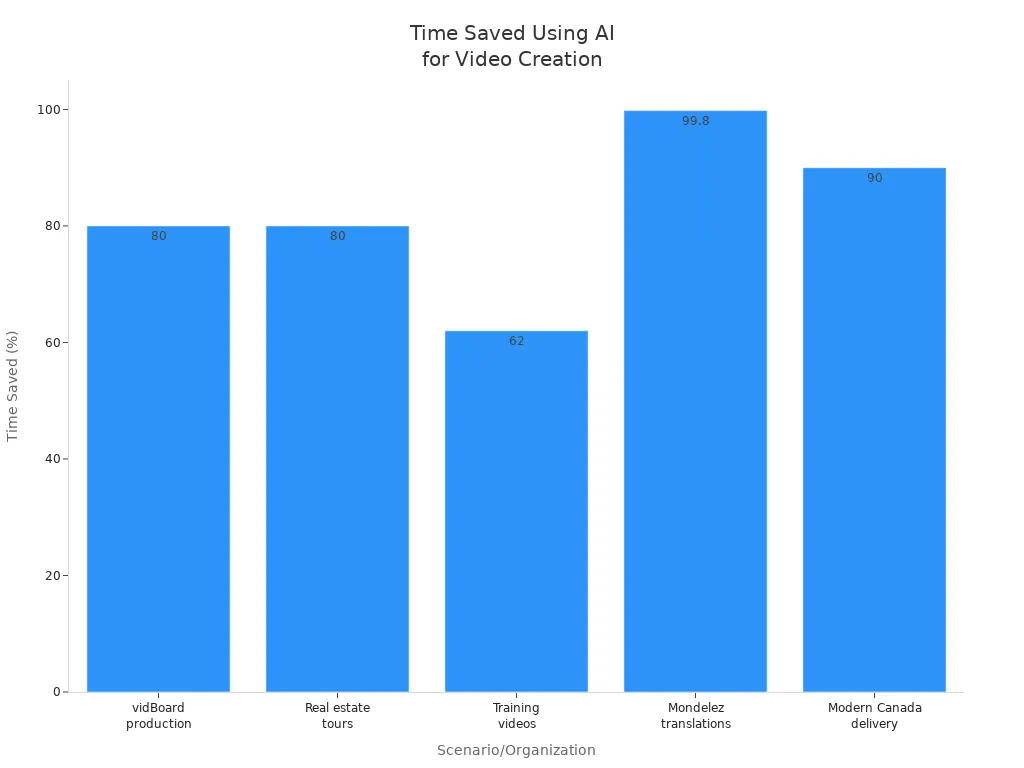
AI video generation removes boring parts of making news videos. You can spend more time telling a good story.
Tip: Try different ai video generators for each news type. Use Boolvideo for fast news. Use Runway Gen-3 for longer stories.
Customize Presenter
Next, you give your news video a face. AI avatars have changed how news looks. You can pick an avatar or make your own anchor. These avatars can look real, match your brand, and speak many languages.
Here is why using an avatar in your news video is helpful:
AI anchors share news in a fun and lively way. Realistic avatars and special content keep people watching.
You can add things like live polls or Q&A. This makes your news video feel like a chat.
AI avatars can translate fast. Your news video can reach people who speak other languages.
You can share breaking news quickly. AI anchors do not need breaks, so your channel is always current.
Personalization is simple. AI avatars can change their look or voice for your viewers.
You keep your brand the same. Custom avatars help your news channel be unique.
AI video makers like Synthesia and HeyGen let you choose your avatar’s style. You can pick their hair, clothes, voice, and accent. Some tools let you upload a photo to make an avatar that looks like you or your mascot.
Note: AI avatars can share news all day and night. You do not need to worry about hiring or scheduling a real anchor.
Voiceover & Subtitles
The last step in ai video creation is adding voiceovers and subtitles. AI video makers turn your script into speech that sounds real. You can pick from many voices, accents, and languages. This makes your news video sound good and helps more people watch.
Adding subtitles is also important. Many people watch news videos with no sound, especially on social media. AI subtitles help everyone follow your story. Subtitles also help people who are deaf or hard of hearing. They make your news video easier for everyone to enjoy.
Here is a table showing how AI voiceovers and subtitles help more people watch your news:
Aspect | Evidence | Impact on Accessibility and Audience Reach |
|---|---|---|
Accessibility for people with disabilities | AI-powered subtitles provide accurate, real-time, multilingual subtitles and audio descriptions for visually impaired users and adaptive subtitles for cognitive disabilities. | Enhances inclusivity and ensures content is accessible to a wider range of disabilities. |
Viewer engagement and retention | Statistics show video engagement increases by up to 40%, and viewer retention improves by up to 25% with AI-generated subtitles. | Improves audience reach and keeps viewers engaged longer. |
Production efficiency | AI reduces production time by up to 80% and costs by up to 70%, making high-quality accessible content more feasible. | Enables more creators to produce accessible content at scale. |
Market growth | The global subtitle generator market is projected to grow at a CAGR of 18% from 2025 to 2033, with a market size estimated at $1.5 billion in 2025. | Reflects increasing demand for accessible and inclusive video content worldwide. |
Broader audience benefits | Many users watch videos with sound off (85%), and 70% prefer subtitles even if not hard of hearing. Subtitles help in noisy environments and for non-native speakers. | Expands audience reach beyond people with disabilities to general viewers globally. |
Human-AI collaboration | Hybrid workflows combining AI efficiency with human oversight ensure cultural sensitivity, quality, and ethical use. | Maintains high-quality, culturally appropriate content, fostering trust and inclusivity. |
AI video makers also let you add music and watermarks. Music sets the mood for your news video. Watermarks protect your brand and make your news look more official.
Tip: Always check your subtitles for mistakes. AI does a good job, but checking helps you avoid errors.
AI video creation tools let anyone make great news videos. You can add media, pick your avatar, and finish with voiceovers and subtitles—all in one place. This is why ai video generation is changing news for everyone.
Edit & Publish
Review Quality
You have finished your news video, but don’t rush to publish it yet. Take a moment to review the quality. AI-powered tools like CapCut make this step easy. You can use them for video editing, color correction, and adding captions. Here are some best practices to follow:
Check for data privacy. Make sure your news video does not share personal information without consent.
Use captions. This helps viewers who are deaf or hard of hearing.
Review the script and visuals. Look for mistakes, stereotypes, or anything that feels off.
Always have a human review. AI is smart, but you know your audience best.
Add disclaimers if you use AI avatars or heavy editing. This keeps your ai news channel transparent.
Update your editing process as AI technology changes.
A digital reporter shared that AI-powered tools like ChatGPT and HeyGen made news video editing much faster. You can now focus more on telling a great story and less on manual video editing.
Export Video
Now you are ready to export your news video. AI-driven news channel creators love how AI tools save time and money. You do not need a big team or expensive software. AI-powered tools help you pick the best export settings for each platform. They improve lighting, audio, and transitions, so your video looks sharp.
Before you export, check these things:
Make sure your news video is accurate and follows ethical standards.
Double-check your branding. Your logo and colors should match your ai-driven news channel.
Use SEO optimization. Add keyword-rich titles, descriptions, and tags to help people find your news video.
Choose the right format for YouTube, TikTok, or Instagram. AI tools can help with this step.
Tip: Add a call-to-action at the end of your news video. Ask viewers to subscribe or share.
Share News
You have exported your news video. Now it’s time to share it with the world. AI-driven news channel creators often use YouTube, TikTok, and Instagram. You can even run a faceless channel if you want to stay behind the scenes.
Here’s a quick checklist for publishing:
Create an eye-catching thumbnail. AI tools can help you design one fast.
Use SEO best practices. Write engaging descriptions, add timestamps, and use relevant tags.
Schedule your news video for the best time. AI analytics can suggest when your audience is most active.
Organize your videos into playlists. This keeps viewers watching longer.
Engage with your audience. Reply to comments and ask questions to build a community.
AI-powered tools make it easy to publish news videos across many platforms. You can reach more people and grow your ai-driven news channel faster than ever.
news video production Tips
Automation
Automation helps you make news videos much faster. AI tools finish jobs that used to take a long time. You can use Guidde, Sora, CapCut, Wand, Tonkean, and Zapier. These tools help with editing, scriptwriting, and sharing your news. Look at this table to see which AI tools are best for each step:
Workflow Stage | Recommended AI Tools |
|---|---|
Script Generation | Jasper AI, Writesonic |
Video Generation | Pictory, Lumen5, Synthesia, DeepBrain |
Voiceovers & Avatars | Murf.ai, Play.ht, Resemble AI, Synthesia, Hour One |
Video Editing | Adobe Premiere Pro with Sensei AI, Magisto |
Deployment & Automation | Livebox, Buffer, Hootsuite, RankMath, YoastSEO |
AI video platforms can do transcription, translation, and subtitles for you. You do not need to be an expert to make good videos. Automation lets you spend more time on your story. AI can also help you schedule uploads and keep your channel busy.
Pro Tip: Use cloud-based AI tools. You and your team can work together from anywhere and finish news videos quickly.
Personalization
Personalization makes people want to watch your news again. AI learns what your viewers like and shows them news they care about. You can use AI to change the language, add subtitles, or pick the best avatar for your video. When you personalize, your news feels special.
AI recommendations help people watch longer and come back.
Netflix and YouTube use AI to keep viewers interested in news and other videos.
Real-time AI can change your news video based on what viewers do, so each person gets a unique experience.
AI can also help you add custom calls-to-action in your news videos. This helps you get more likes, shares, and comments. Personalization helps your news channel grow and stand out.
Ethics
You need to think about ethics when using AI for news videos. AI can make news videos look real, but you must be honest and fair. Always check your news to make sure it is true. Tell viewers if you use AI or an avatar in your news.
Here are some tips for making news videos the right way:
Get permission before using someone’s picture or voice.
Do not spread fake news or use AI to trick people.
Protect privacy and follow copyright laws.
Clearly label news made by AI.
Have people check the news before you post it.
Remember: Good news builds trust. Use AI to help, but always keep your news honest and fair.
You can now make news videos much faster with AI. These tools do editing and scriptwriting for you. They also help with branding, so you save time.
You can change news stories to fit your viewers and reach more people.
Easy-to-use platforms like Boolvideo let you focus on the news. You do not have to learn hard software.
Try these steps and see how easy it is to share your news video today!
FAQ
Can I make a news video with AI if I have no video editing experience?
Absolutely! You do not need any editing skills. AI tools like Boolvideo guide you step by step. You just follow the prompts, and the tool does the hard work for you.
How long does it take to create a news video with AI?
You can make a short news video in about 10 to 30 minutes. AI speeds up every step, from scriptwriting to editing. Longer videos may take a bit more time, but it’s still much faster than old methods.
Do I need to pay for AI news video tools?
Many AI tools offer free versions. These usually have limits on video length or features. If you want more options, you can try paid plans. Always check what each tool offers before you start.
Can I use my own voice or face in the AI news video?
Yes, you can! Some AI tools let you upload your voice or photo. You can also pick from AI avatars and voices if you want to stay off camera. This gives you lots of choices for your news style.
See Also
Master Crafting Eye-Catching Video Ads Using AI In 2025
Top Five AI Video Makers Every Creator Needs In 2025
Guide To Making Successful Faceless YouTube Videos With AI
Accelerate your video production
10X with Boolvideo