Top 5 CapCut Alternatives for Android Brazilian Creators Should Use

Are you tired of using CapCut? Many creators feel the same way! It's a decent editor, but what if you could do more? Imagine crafting videos with human-like AI voices, editing right from your Android browser, and reaching global audiences effortlessly.
The AI video tool revolution is here, offering smarter alternatives built for modern needs. In this guide, we’ll uncover the top 5 CapCut alternatives for Android and reveal why Boolvideo steals the spotlight with its killer AI voiceovers, slick online editor, and mobile-friendly features. Ready to upgrade your content game? Let’s dive in!
Why Look for a CapCut Alternative? The Rise of AI Video Tools
CapCut has taken the mobile editing world by storm—and for good reason! Its slick interface and cool effects have made it the trusty sidekick for millions of TikTok and Instagram Reels creators.
But here's the plot twist: CapCut's vast toolbox can be overwhelming for beginners. What if you could create amazing videos just as easily with a simpler, AI-powered workflow?Want Hollywood-quality voiceovers? Editing in multiple languages? Or maybe AI that helps script your videos? That’s where CapCut leaves you hanging.

These powerful platforms offer the same seamless editing experience as CapCut, but supercharged with intelligent features that make professional-quality video creation easier than ever. With advanced AI that can generate stunning videos with just a single click, and toolkits more comprehensive than ever, creators are quickly switching to these game-changing alternatives.
The Limitations of Standard Editors
While versatile, traditional mobile video editors like CapCut often rely heavily on manual input. Adding voiceovers, for example, typically require you to record your own voice or source royalty-free music, which can be time-consuming and may not suit every project. For creators targeting a global audience, the lack of high-quality, AI-generated multilingual voiceovers (ia de voz gratuito) is a significant gap. Additionally, some advanced features are locked behind paywalls, and access can be limited in certain regions.
Key Demands from Modern Creators
Today's Android creators are looking for more than just cutting and trimming. Their checklist for the ideal editor includes:
AI Voice Generation : Access to a variety of natural-sounding, emotional voices in multiple languages.
Cloud-Based Editing : The ability to edit seamlessly from any device, without draining phone storage or needing a high-end smartphone.
Template & Automation: A rich library of templates and AI-assisted creation to produce content faster.
Global Reach: Tools that break down language barriers, making it easy to create engaging content for international viewers.
The AI Revolution in Content Creation
This is where the new wave of AI video tools (ia que cria videos) comes in. These platforms are revolutionizing the game by using artificial intelligence to automate and enhance the creative process. Imagine an editor that doesn't just provide the tools but actively helps you create. AI can now generate human-like voiceovers from text, create videos from simple prompts, auto-match clips to music beats, and even suggest optimal edits—all with minimal manual effort.
Top 5 Alternatives to CapCut for Android
So, you're ready to explore beyond CapCut and turbocharge your content with AI? Excellent choice! The world of AI video tools is like a superhero team—each member has its own unique power. Let's meet the all-star lineup that will make your Android editing faster, smarter, and a lot more fun.

Here’s our quick-fire list of the top 5 contenders you need to know:
Boolvideo
Boolvideo isn't just an editor; it's your personal dubbing master. If your content needs to speak to the world in any language, this is your go-to. Its superpower is generating incredibly natural and expressive AI voiceovers (ia de voz) in a multitude of languages and accents. Perfect for creators who want to effortlessly localize their videos for global audiences like Brazil, without ever recording their own voice.
Vidnoz AI
Vidnoz AI is the friendly giant of the AI video world. It’s incredibly user-friendly and packs a massive punch with its huge library of templates and avatars. Think of it as your fast-pass ticket to creating professional-looking videos for social media, marketing, or presentations in minutes. No fancy skills required—just pick a template and let the AI do the heavy lifting.
Fliki
Got a blog or a script? Fliki is your dream machine. This tool is a genius at turning plain text into engaging videos. Just feed it your article or script, and it will magically generate a video complete with a realistic AI voiceover and relevant stock footage. It’s like having a direct neural link from your thoughts to your YouTube channel!
Similarvideo
Speed is the name of the game with SimilarVideo. This tool is all about helping you churn out those short, engaging, and trendy clips for TikTok, Reels, and Shorts at lightning speed. It offers smart editing features and templates tailored for the vertical video format, making it a powerhouse for social media addicts.
Imolve
Imolve is the versatile contender that comes out swinging with a bit of everything. It offers a solid combination of editing tools, AI features, and effects, aiming to be a comprehensive one-stop-shop for your video needs. If you're looking for a well-rounded alternative that can handle a variety of tasks without switching apps, Imolve is a strong bet.
Boolvideo vs. The Competition: A Quick Glance
Feature | Boolvideo | CapCut | Vidnoz AI | Fliki |
AI Multilingual Voice | Extensive | Limited | Basic | Strong |
Online Editing | Full-featured | App-dependent | Template-focused | Text-focused |
Android Browser Support | Optimized | Requires app | Limited | Limited |
Free Tier | Generous | Yes | Yes | Yes |
How to Choose the Best Alternative for You?
AI Voice Quality & Variety: Don't just settle for "AI voice." Listen to samples. How many languages (idiomas) and accents are there? Are the voices expressive or robotic? This is where Boolvideo invests heavily to stand out.
Editing Flexibility vs. Simplicity: Do you need a full-featured editor for precise control (Boolvideo, Imolve), or do you prefer a more template-driven, automated approach (Vidnoz)?
Platform & Device Compatibility: Since you're an Android user, ensure the tool works flawlessly on your device. A cloud-based editor like Boolvideo means you can start on your phone and finish on your laptop without transferring files.
The Cost of Quality: Most have free plans, but check the limits. How many free video minutes do you get? Are the premium voices behind a paywall? Is the export watermark-free? Boolvideo offers a generous free tier to properly test its core features.
Match Your Goal to the Tool: Your Decision Matrix
Your Primary Goal | Recommended Tool | Why It's a Great Fit |
Creating videos for a global audience | Boolvideo | Unbeatable multilingual AI voiceovers and easy dubbing make localization simple. |
Maximum ease & speed with templates | Vidnoz AI | Huge template library for creating professional videos in minutes with zero stress. |
Turning blogs/scripts into videos easily | Fliki | Its strength is AI-driven text-to-video conversion with solid voice synthesis. |
Creating high-volume social clips fast | SimilarVideo | Built for the speed and format required by TikTok, Reels, and Shorts. |
A powerful all-in-one solution | Imolve | Balances strong editing features with AI assistance for a comprehensive toolkit. |
While each tool has its strengths, Boolvideo consistently emerges as the most versatile and powerful CapCut alternative for Android for one crucial reason: it solves the two most universal challenges for creators—time and reach.
By mastering AI voice technology, it removes the single most time-consuming bottleneck in video creation (recording audio) and simultaneously unlocks the ability to easily connect with audiences worldwide. Its robust online editor and Android-friendly design mean you never have to compromise on quality for convenience.
In-Depth Review: Why Boolvideo is the Ultimate Choice
In the crowded landscape of AI video tools, Boolvideo stands out not just as an editor, but as a comprehensive content creation ecosystem. Designed specifically for the needs of modern creators—especially those on Android devices—it combines cutting-edge AI automation with profound creative control. Here’s why it might be your ultimate CapCut alternative.
Multilingual Voiceovers: Break Language Barriers with Natural-Sounding Audio
Boolvideo delivers high-quality, AI-powered voice generation in over 20 languages, including English, Chinese, Spanish, French, German, and Japanese. Its diverse voice library offers a wide spectrum of tones and styles—from “professional and authoritative” to “energetic and conversational.”
For example:
E-commerce promotions shine with a vibrant female voice;
Educational content gains trust through a clear, steady narration;
Documentaries feel immersive with a deep, cinematic delivery.
The platform also supports voice cloning, allowing users to replicate their own vocal tone and generate personalized audio in 29 languages. Every voiceover includes AI-powered lip-sync, automatically matching mouth movements to the spoken language for a natural viewing experience.
Fully Web-Based: No Downloads, No Storage Worries, Edit Anywhere
Boolvideo runs entirely online—no installation required. Access it directly from your browser (Chrome, Safari, Edge, etc.) and enjoy:
Full cross-device compatibility on PC, Mac, tablets, and smartphones;
Cloud-saving: All your projects and media are stored online—zero local storage used;
Real-time collaboration: Invite team members to edit scripts, voiceovers, or subtitles together.
Built with a responsive, multi-screen UI, Boolvideo delivers a seamless editing experience across all devices.
AI-Powered Automation: Turn Ideas into Videos in Minutes
Boolvideo simplifies video creation using smart automation without sacrificing quality. Key features include:
One-Click Video Generation (Idea/Script-to-Video)
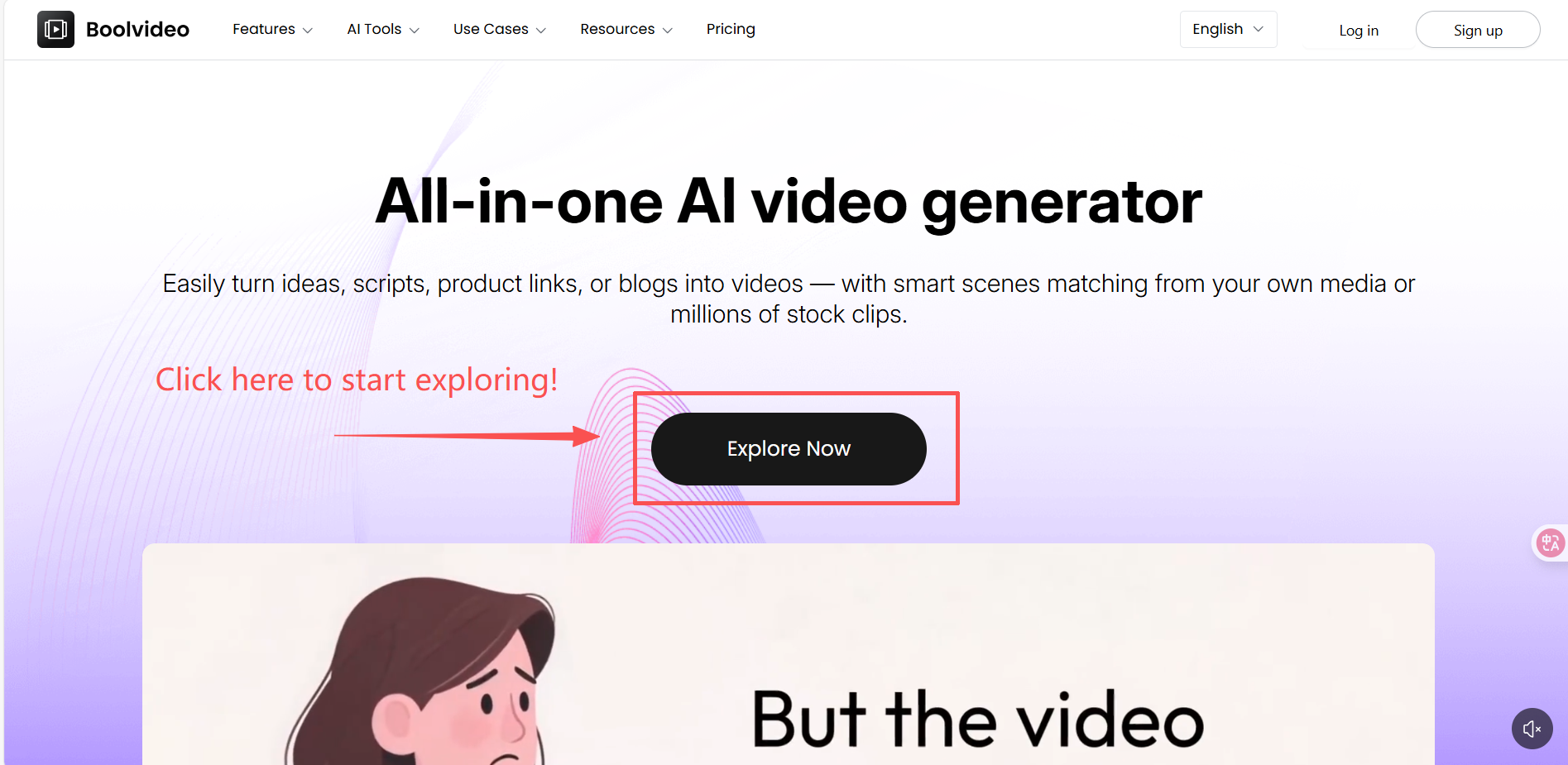
Turn your ideas or text into a ready-to-use video in just one minute.
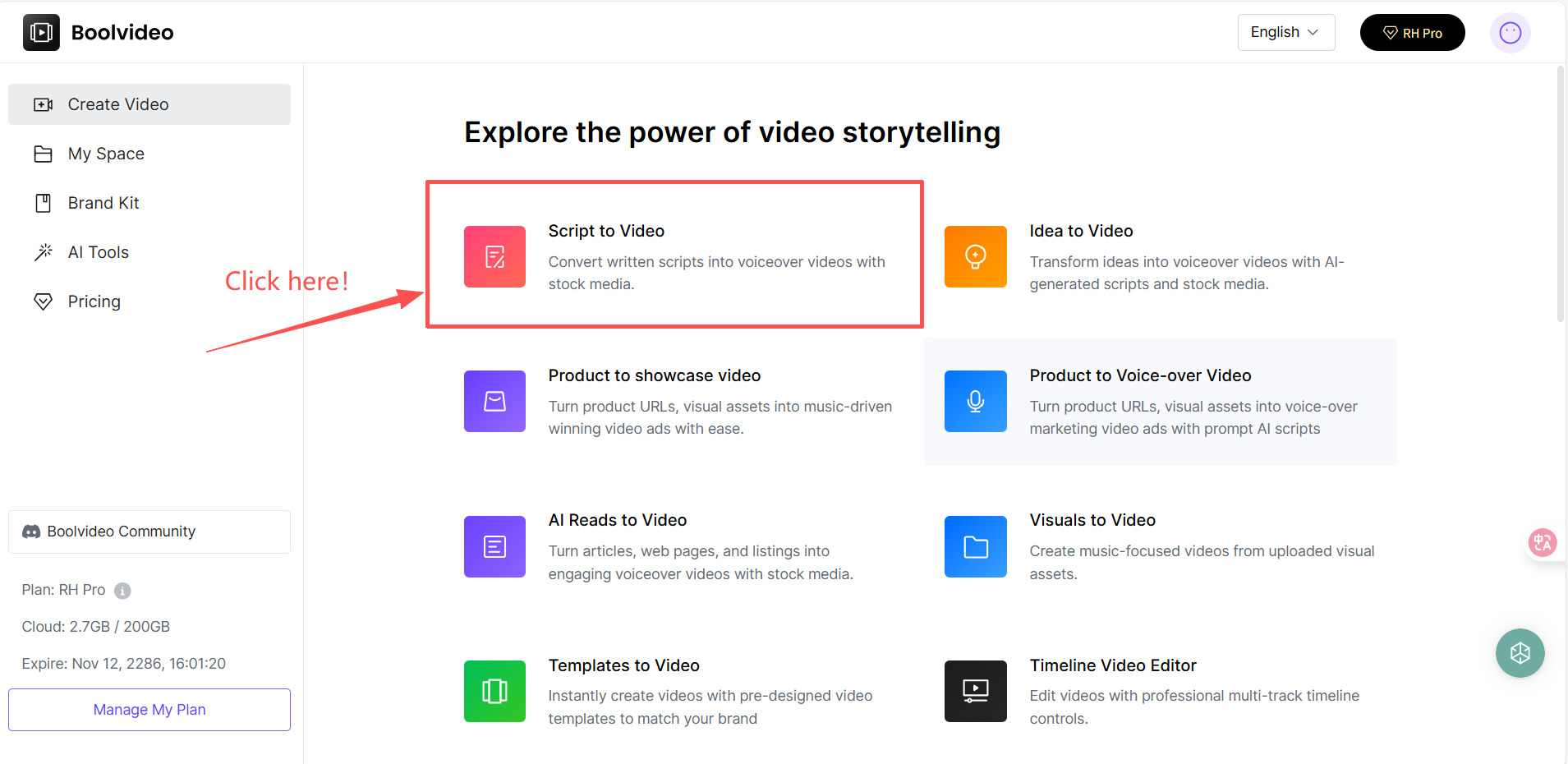
Start by uploading your own images and video footage to your Custom Media Library—this allows Boolvideo to prioritize your assets for a fully personalized look. Then, simply input your script or idea.
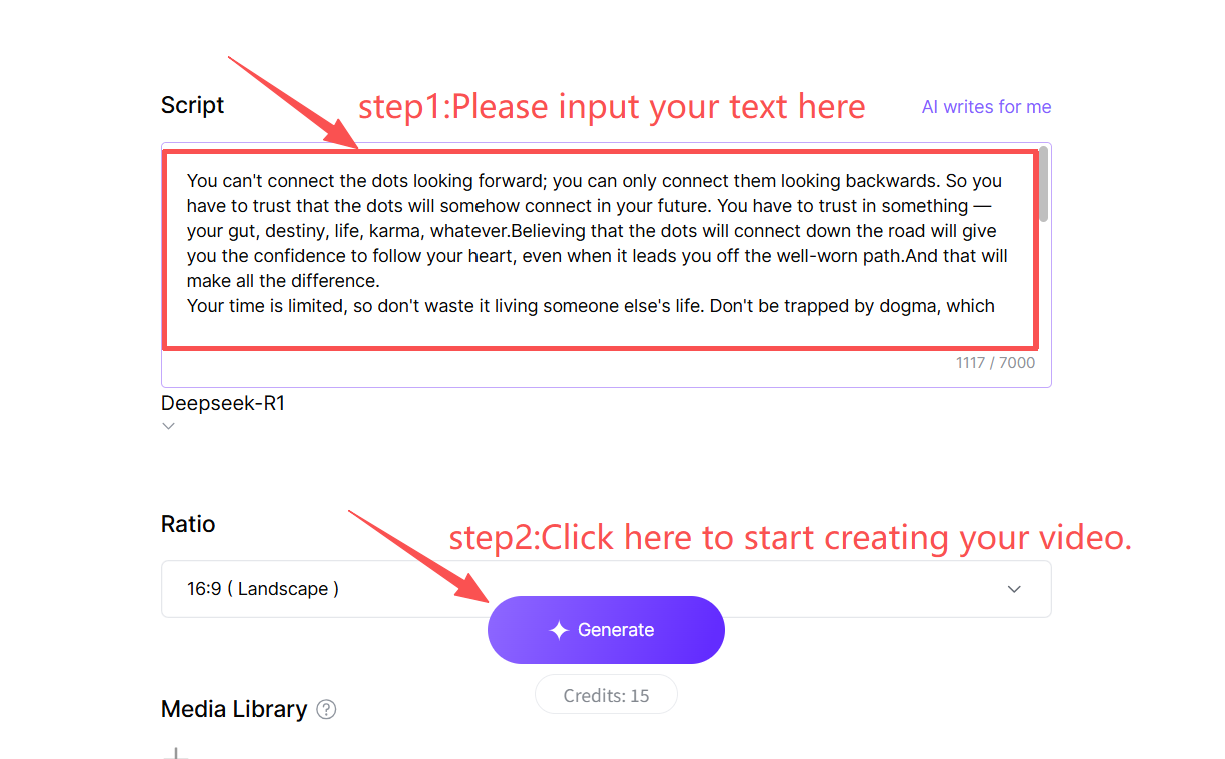
In about 2 minute, our AI generates a polished video complete with matching visuals, background music, AI voiceover, and subtitles—all tailored to your content.
Whether you’re creating social ads, video summaries, or branded stories, Boolvideo puts your media and your vision front and center.
Integrated AI Tool Suite
Animate Image with AI: Bring still images to life;
AI Background Remover: Instantly remove backgrounds from videos or images;
Remove Object: Clean up unwanted elements in any scene;
AI Photo Enhancer: Improve lighting, sharpness, and color automatically;
Video Background Remover: Replace video backgrounds with one click.
Everything is integrated into one workspace—no switching between tools or tabs.
Powerful Web Editor + Template Library: Edit with Efficiency and Precision
Boolvideo combines ease and flexibility through its web-based editor, which supports:
Real-time script tweaking: Revise AI-generated narration or dialogue on the fly;
Multi-track timeline: Fine-tune scenes, audio levels, and subtitle styling;
Voice & subtitle sync: Auto-generate subtitles in 125 languages aligned with voiceover;
Rich template collection: Choose from professionally designed templates for ads, education, social storytelling, and more—replace content and export instantly.
New templates are added weekly. Users can also save and reuse custom templates for brand consistency.
Why Boolvideo is the Ultimate Choice?

Boolvideo isn’t just another editor—it’s a strategic tool for growth. By solving key pain points like multilingual voiceovers, mobile accessibility, and automated editing, it empowers creators to produce high-volume, professional content faster. For Android users seeking a CapCut alternative that prioritizes AI innovation and global reach, Boolvideo is the clear winner. Ready to experience the difference? Start creating Boolvideo for free today!
FAQ
Do I need to download an app to use these alternatives?
Not necessarily. Cloud-based tools like Boolvideo run directly in your Android mobile browser, offering full-featured editing without any download, saving your phone's storage.
Which alternative is best for Brazilian creators who need Portuguese voiceovers?
Boolvideo is a top choice as it features high-quality, natural-sounding AI voices in Portuguese and many other languages, making it easy to create engaging content for your local audience.
Is there a free CapCut alternative for Android?
Yes! Many top alternatives, like Boolvideo, offer robust free plans. You just type your topic, and it suggests lines for your video.
Accelerate your video production
10X with Boolvideo