A Beginner’s Guide to Making Craft Short Videos

You can jump into making craft short videos without any fancy gear. Your smartphone and a few craft supplies work just fine. If you ever feel stuck, you’ll find tons of free help online. Here are a few places where you can get support:
Online craft groups on Facebook
Meetup.com for local crafters
Free lists of must-have tools to download
Websites like Craftsy and Creativebug with free classes
Thousands of free craft project video tutorials in every category
You don’t need to be an expert to start. Just grab your phone and let your creativity shine in your next video.
Craft Short Videos Overview
What Are Craft Short Videos
You might wonder what makes craft short videos different from other types of art and craft videos. These videos are quick, usually under three minutes, and often even shorter. You see them everywhere—on TikTok, Instagram Reels, and YouTube Shorts. The goal is to grab your attention right away with a strong hook, like a bold visual or a surprising question. Each video focuses on one clear idea, so you never feel lost or overwhelmed.
When you watch a craft short video, you notice how the creator uses bright visuals, fast scene changes, and catchy music. Many videos include captions, so you can follow along even if you have the sound off. Most of these videos are shot vertically, which fits your phone screen perfectly. Creators often add a call to action, like asking you to try the diy project or share the video. These videos show off the creator’s style and personality, making you feel connected to them. You get to see the whole diy process in just a few steps, which makes learning new craft skills fun and easy.
Tip: If you want to make your own craft short videos, start with a simple diy project and focus on clear, close-up shots. Use captions to help viewers follow along.
Why They’re Popular
Craft short videos have exploded in popularity over the past few years. Just look at the numbers:
Platform | User Growth / Engagement Metrics | Timeframe |
|---|---|---|
TikTok monthly users | 2021–2027 | |
Instagram Reels users | 2.35 billion | Since 2020 |
YouTube Shorts daily views | As of 2025 | |
Videos under 90 seconds | Retain 50% of viewers | Current trend |
Preference for short video | 96% favor short-form videos | Recent survey |
You probably love these videos because they show off cool skills you might not have seen before. Watching someone turn simple materials into something amazing is both fun and educational. The process feels quick and satisfying, so you never get bored. Many people enjoy diy because it feels creative and relaxing. With craft short videos, you get inspiration and ideas in just a minute or two.
You learn new diy tricks without spending hours watching.
The videos are entertaining and easy to share with friends.
There is less competition, so you can stand out if you start making your own.
Popular topics include drawing, woodworking, paper art, sewing, and pottery.
Craft short videos make it easy for anyone to jump into the world of diy and craft. You can watch, learn, and even create your own—all from your phone.
Essential Tools
Smartphone or Camera
You don’t need a fancy camera to make a great craft short video. Most smartphones today can do the job. If you want your video to look sharp and clear, check that your device meets these basic specs:
Specification/Feature | Minimum/Recommended Requirement |
|---|---|
Main Camera Resolution | |
Ultra-wide Camera | At least 12MP |
Optical Zoom | Supported (like 3x optical zoom on iPhone 13 Pro) |
Video Resolution | 4K video recording support |
Multi-camera Setup | Wide, ultra-wide, telephoto recommended |
Stabilization | Hardware/software stabilization helps |
Editing Software | Movavi Clips, Movavi Video Editor suggested |
Battery Life | Long battery life is best for editing |
If you use an iPhone, the default camera app works well for video. On Android, you might want to try a third-party camera app for better results. Good stabilization makes your video look smooth, so check if your phone has this feature. You can always upgrade later, but your current phone is a great place to start.
Tripods and Lighting
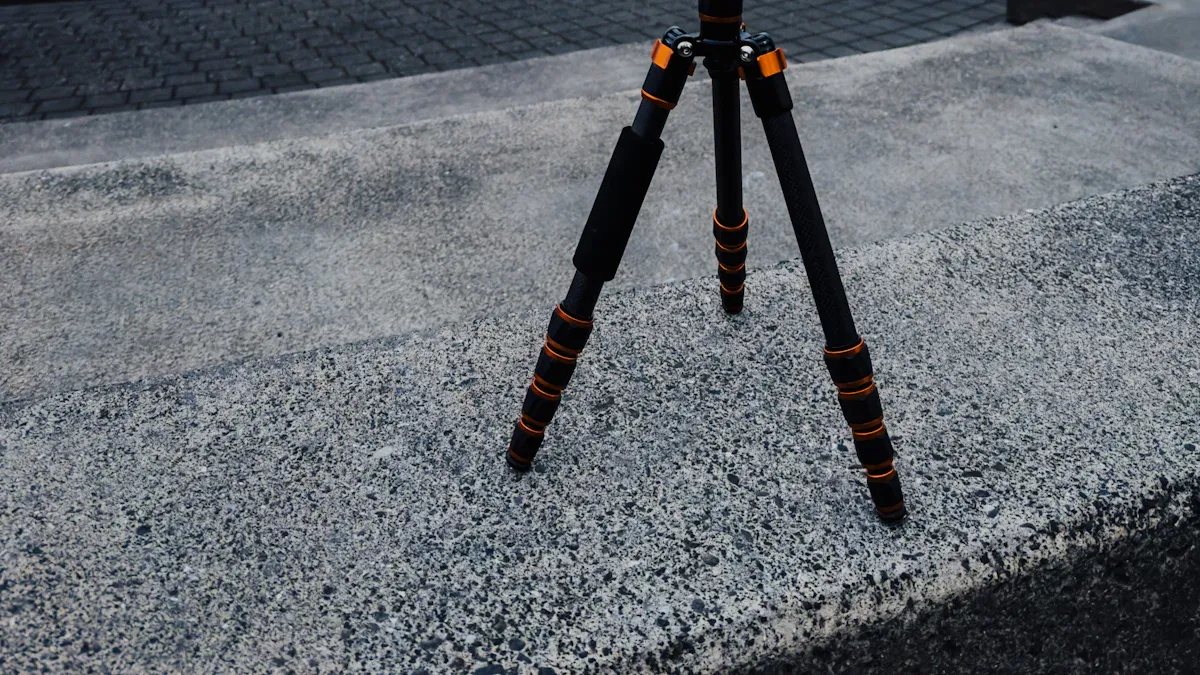
A steady shot makes your craft video look professional. Tripods help you keep the camera still, so your viewers can focus on the craft, not shaky footage. Even a simple tabletop tripod can make a big difference. If you don’t have a tripod, try propping your phone up with books or a mug.
Lighting matters just as much as a steady shot. Good lighting brings out the colors and details in your craft. Experts say that lighting shapes the mood and makes your video pop. You can use natural light from a window or a basic ring light. Avoid harsh shadows by facing your light source. With the right lighting, your craft video will look bright and inviting.
Tip: Try filming your video near a window during the day for soft, even light.
Planning
Choosing Crafts
Picking the right crafts for your short videos can make your channel stand out. Start by thinking about what you enjoy. Do you love working with vinyl? Maybe you like quick diy projects or easy-to-follow crafts that use simple supplies. Try to choose crafts that are fun, colorful, and not too complicated. Viewers love projects they can finish in one sitting. If you’re new, start with beginner vinyl crafts. These projects often use basic shapes and tools, so you won’t feel overwhelmed. You can also look for trending crafts on YouTube or in vinyl craft groups. This helps you find ideas that people want to watch and try.
Tip: Make a list of five crafts you want to try. Pick one that feels exciting and easy to follow for your first video.
Outlining Steps
A clear outline helps your viewers understand each step of your craft project. You want your tutorial to be easy to follow from start to finish. Here’s a simple way to plan your video:
Hook: Show the finished craft or ask a fun question to grab attention.
Setup: Introduce the supplies and explain what you’ll make.
Steps: Break down the process into small, easy-to-follow actions. Use close-up shots for tricky parts.
Reveal: Show the final result and celebrate your project.
Call to Action: Invite viewers to try the craft, share their projects, or follow your channel.
Keep your outline short and focused. If you use vinyl, show each step clearly, like cutting, weeding, and applying the design. This makes your tutorial easy to follow and helps beginners feel confident.
Simple Script
A script keeps your tutorial on track and makes your message clear. Write down what you want to say for each part of your video. Use friendly, simple language. Imagine you’re explaining the craft to a friend who has never tried vinyl crafts before. Start with a strong hook, like “Want to make a custom vinyl sticker in five minutes?” Then guide viewers through each step. Mention tips, like how to avoid bubbles when applying vinyl. End with a call to action, such as “Share your vinyl projects in the comments!” A good script helps you stay focused, keeps your tutorial easy to follow, and makes editing much faster.
Note: Planning your visuals, like close-ups of vinyl cutting or finished projects, will make your video more engaging and easy to follow.
Editing
You’ve filmed your craft project, and now comes the fun part—editing your video! Editing helps you turn raw clips into a polished, eye-catching video that people want to watch. You don’t need expensive software to get started. Many beginners use free or low-cost editing tools that work right in your browser. Here’s a quick look at some popular options:
Tool | Platform | Key Features & Benefits | Pricing Highlights |
|---|---|---|---|
Motionbox | Web-based | Real-time team editing, drag-and-drop templates, auto subtitles, crop for social media | Free plan with 2GB storage, 720p export, watermark |
Clipchamp | Web-based | No download needed, free 1080p exports, stock footage, team editing | Free unlimited 1080p exports; paid plans from $9/mo |
Veed | Web-based | Beginner-friendly, no account needed, subtitles, effects, noise removal | Free plan with watermark, 10-min limit |
Type Studio | Web-based | AI captions, fast editing, video templates | Free for videos under 10 min/month |
Adobe Premiere | Desktop | Advanced features for artistic video editing | Paid subscription |
How to Create Your Short Video
Recording Your Video
Recording is where your vision starts to take shape. To make a short video that stands out, follow these steps:
Choose a clean, well-lit background. A clutter-free space keeps the focus on you or your subject. Natural light works wonders, but if you’re indoors, position yourself near a window or use a ring light for even lighting.
Record multiple takes. Don’t settle for the first shot. Experiment with angles, expressions, and pacing. This gives you more options during editing and ensures you capture the best version of your content.
Planning your content beforehand makes this process smoother. Tools like Boolvideo can help you organize your ideas and prepare for a seamless recording experience.
Editing Your Video
Editing transforms raw footage into a polished masterpiece. To make a short video that’s concise and engaging, focus on these techniques:
Trim unnecessary parts. Cut out pauses, mistakes, or anything that doesn’t add value. Keep your video under 60 seconds for platforms like Instagram Reels or TikTok.
Add text, transitions, and effects. Use overlays to highlight key points or guide viewers through your story. For example:
A zoom transition can emphasize important details.
A fade transition creates smooth scene changes.
A push transition signals a major shift in your narrative.
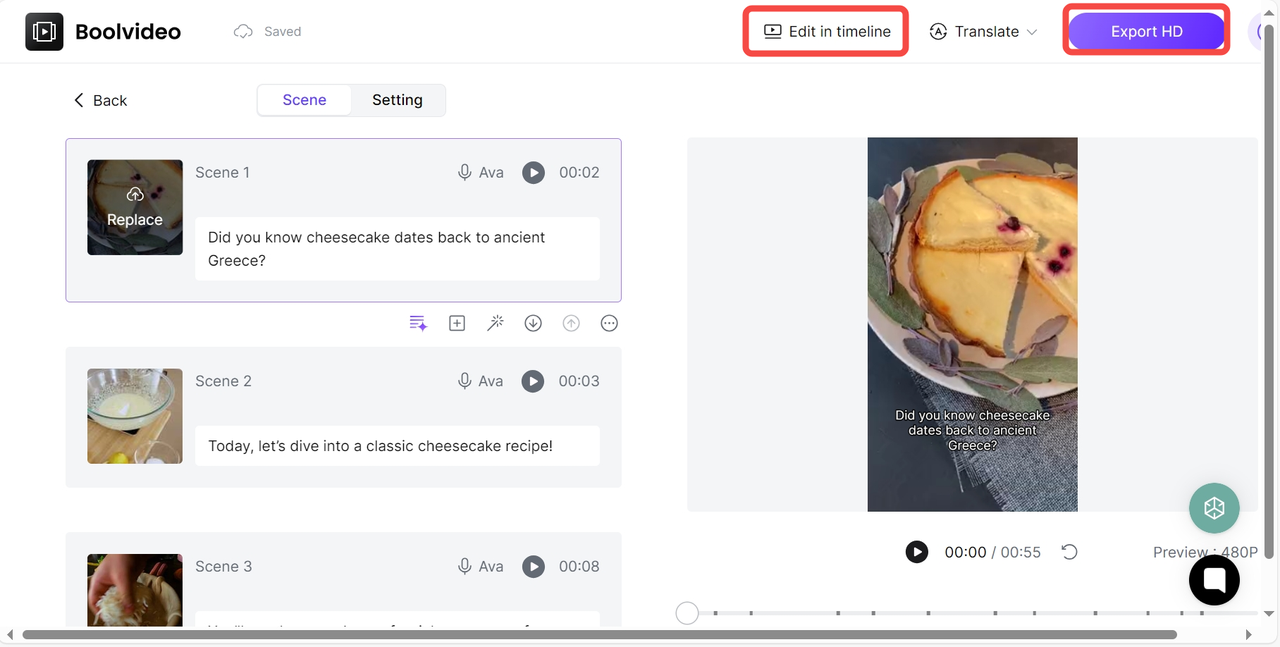
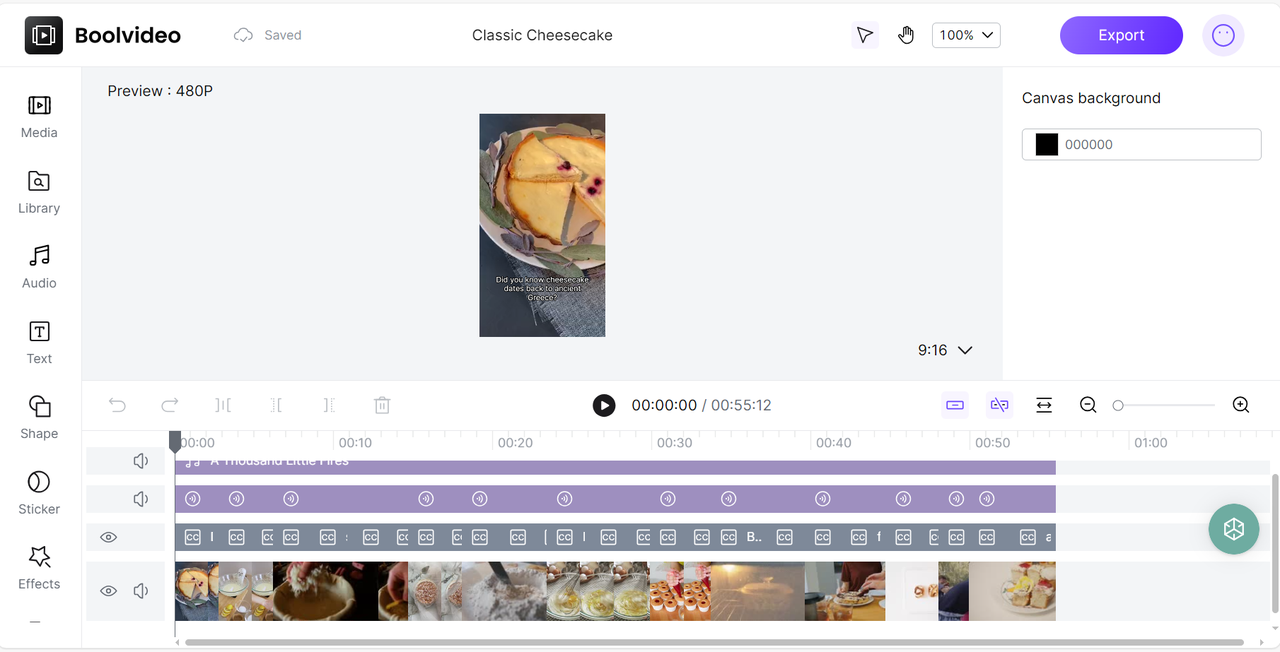
Boolvideo’s intuitive editor simplifies this process. You can drag and drop elements, sync visuals with music, and even use customizable templates to enhance your video’s appeal.
Adding Final Touches
The final touches bring your video to life. Here’s how to make it unforgettable:
Include background music or trending audio clips. Music adds emotion and keeps viewers hooked. Platforms like iStock Music offer royalty-free tracks, or you can explore trending sounds on social media. Syncing your visuals to the beat creates a professional feel.
Add captions. Captions improve accessibility for viewers with hearing impairments and help non-native speakers follow along. They also boost engagement—Facebook found that captioned videos increase watch time by 12%. With Boolvideo, you can easily add captions to ensure your message reaches everyone.
Once you’ve completed these steps, your short-form video is ready to share with the world. Whether you’re educating, entertaining, or promoting, these techniques will help you create your own short video effortlessly.
Sharing and Finding Free Craft Short Videos
Sharing your craft short videos with the world feels exciting and rewarding. You can inspire others, learn new skills, and join a creative community. Let’s look at how you can share your work and find free craft short videos to boost your creativity.
YouTube Tips
YouTube stands out as the top place to share and discover craft short videos. You can reach a huge audience, connect with other crafters, and even grow your own youtube channel. Here’s how you can get started with uploading to youtube and making your videos shine:
Export your finished video in MP4 format with 1080p or higher quality.
Watch your video before uploading to check for any mistakes.
Set up your youtube channel. Add a fun bio and choose a custom handle so people remember you.
Write a catchy title and description. Use keywords like beginner vinyl crafts, vinyl, and free to help people find your video.
Make sure your video fits YouTube’s specs: 16:9 aspect ratio and accepted formats like .mp4 or .mov.
Design a bright, simple thumbnail. Use clear images and easy-to-read fonts.
Upload your video. Fill in the title, description, tags, and set your privacy options.
Share your video on social media, blogs, and with friends to get more views.
Try repurposing your content into YouTube Shorts or other formats for even more reach.
Tip: Always upload from a desktop if you want access to advanced settings. This helps you optimize your video for better results.
When you want to create a Short, open the YouTube app, tap the '+' icon, and select 'Create a Short.' Record your video, use editing tools like filters and effects, and add free music or text overlays. Pick a cover image, set your privacy, and tap 'Upload Short.' You can add a caption and choose if your video is for kids or everyone.
To make your craft short videos stand out, follow these tips:
Do keyword research and use those words in your title, description, and tags.
Make custom thumbnails with bright colors and clear images.
Write short, engaging titles (about 50 characters) that spark curiosity.
Collaborate with other creators to reach more viewers.
Promote your videos on Instagram, Facebook, and other platforms.
Update your channel trailer often to keep it fresh.
YouTube gives you a free way to share your creativity and connect with people who love crafts. You can find thousands of free craft short videos by searching for beginner vinyl crafts, vinyl projects, or free music for your videos.
Free Online Resources
You have so many free online resources to help you create and find craft short videos. Canva is a favorite for many crafters. You can use its free video maker with over a million templates. The tools are easy for beginners, and you don’t need any design experience. Canva lets you add free music, sync audio with your video, and use AI tools to make your videos look professional. You can share your finished videos straight to social media or download them without watermarks.
YouTube itself is packed with free craft short videos. Just search for beginner vinyl crafts, vinyl art, or free music for crafts. You’ll find channels that offer step-by-step guides, quick tips, and creative ideas. Many creators share their favorite free resources in their video descriptions.
Domestika is another platform where you can find high-quality craft videos. While most classes are paid, you get one free class credit each month. The courses are led by artists from around the world, and you can watch with subtitles if you need them.
Note: Always check if the music you use is free for your videos. YouTube and Canva both offer free music libraries.
Here’s a quick table to help you compare popular platforms for free craft short videos:
Platform | Cost | Access Type | Notes |
|---|---|---|---|
YouTube | Free (ad-supported) | Open to all users | Huge selection of free craft short videos. Quality varies. Great for vinyl and diy. |
Domestika | Some free classes | Subscription/a la carte | High-quality, artist-led courses. One free class credit monthly. Subtitles available. |
Canva | Free plan available | Web/mobile | Free video maker, templates, and free music. Easy to use for beginners. |
You can also find free lists of must-have tools, free templates, and free music for your craft videos on these sites.
Social Media Groups
Social media groups give you a place to share your craft short videos, ask questions, and meet other crafters. You can join Facebook groups like Altenew’s Facebook Fan Group. These groups welcome beginners and experts. You can post your beginner vinyl crafts, get feedback, and find free tips from other members.
Instagram is another great spot. Follow craft channels and use features like Stories, Reels, and polls to connect with others. You can share your vinyl projects, watch free craft short videos, and join challenges. Use hashtags like #vinylcrafts, #beginnercrafts, or #freecraftvideo to find new ideas.
Reddit and Quora also have active crafting communities. You can join discussions, share your work, and ask for advice. Many users post free craft short videos and tutorials. You can reply to comments, join group chats, and build friendships with people who love vinyl and diy.
Tip: Stay active in your favorite groups. Reply to comments, share your progress, and help others. You’ll learn faster and make new friends.
If you want to focus on beginner vinyl crafts, look for groups that welcome new members and offer free resources. Many groups host virtual workshops, share free music for videos, and post daily inspiration. You can also find free online events and challenges to join.
You have endless ways to share your craft short videos and find free inspiration. Whether you love vinyl, want to try beginner vinyl crafts, or just need some free music, these platforms and groups have you covered. Dive in, start sharing, and enjoy being part of a creative community!
Quick Tips for Success
Video Quality
You want your vinyl video to look sharp and colorful, right? Start by shooting your crafts in the highest resolution your phone allows—1080p is a great choice for most vinyl projects. Good lighting makes a huge difference. Try filming your diy projects near a window or use a simple lamp to brighten up your workspace. If your video looks dark or blurry, viewers might scroll past it. The right lighting helps show off every detail in your vinyl crafts, especially when you’re working with small pieces or showing step-by-step projects.
Your phone’s hardware matters too. A strong graphics card and a good display panel help your video look smooth and true to color. When you edit, use software that lets you adjust sharpness and color. Always export your vinyl video in MP4 format with H.264 encoding. This keeps your projects looking crisp and makes your video easy to share.
Tip: You can’t fix low resolution after filming, so always record your vinyl crafts at the highest quality possible.
Engagement
Want more people to watch and interact with your vinyl video? Use these tips to boost engagement:
Start your video with a strong hook—show the finished vinyl project or ask a fun question.
Add captions and text overlays so viewers can follow your diy steps, even with the sound off.
Use catchy music that matches the mood of your crafts.
Ask questions in your video to get comments and feedback.
End with a clear call to action, like “Share your vinyl projects below!” or “Try this at home!”
Custom thumbnails help your video stand out. Post your vinyl projects at times when more people are online, like Saturday mornings or Wednesday afternoons. Keep your video short and focused on one main idea. This makes it easier for viewers to watch until the end and try your crafts themselves.
Consistency
Posting your vinyl video regularly helps your channel grow. You don’t need to post every day, but try to share new projects 2-3 times a week. This keeps your audience excited and coming back for more vinyl crafts. Here’s a chart that shows how posting frequency affects growth and engagement for craft video channels:
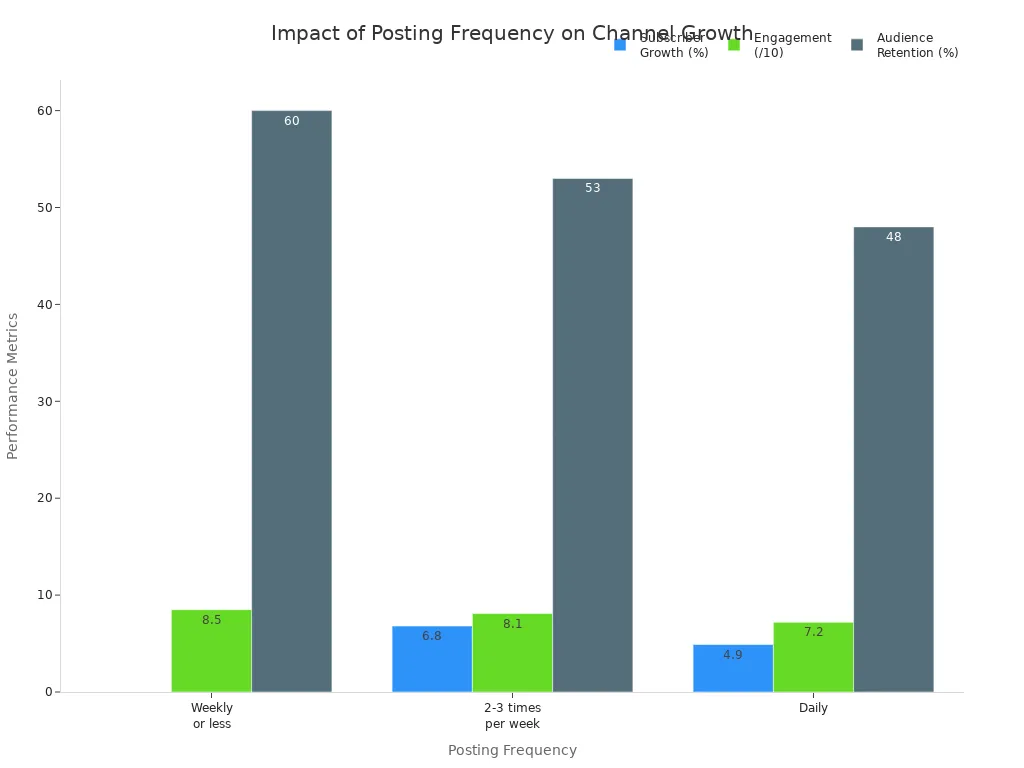
When you post vinyl projects often, you learn what your viewers like. You also give the algorithm more chances to show your video to new people. Focus on quality over quantity. Find a rhythm that works for you, so you can keep making fun vinyl crafts without feeling burned out.
Tip: Make a simple calendar for your vinyl video ideas. This helps you stay organized and consistent with your projects.
You can make your first craft short video by following these steps:
Plan your video and decide what you want to share.
Write a simple script for your video.
Gather your supplies and set up your space for the video.
Record your video using your phone or camera.
Edit your video to keep it short and fun.
Share your video on youtube and other platforms.
youtube offers a huge community where you can find free video tutorials, join challenges, and connect with other creators. Many people use youtube to learn new video skills and get inspired. You can watch youtube videos for ideas, upload your own video, and even join youtube groups for beginners. If you ever feel stuck, youtube has free video classes and friendly groups ready to help. Sharing your video on youtube lets you reach people who love crafts just like you. Every video you post on youtube helps you grow and learn. Remember, youtube is not just for watching—it's for sharing your video and your creativity.
Your video could inspire someone today. Start your youtube journey, share your video, and join a supportive youtube community. You never know who will thank you for your video!
FAQ
How do you start a craft short video on youtube?
You can open the youtube app, tap the "+" button, and pick "Create a Short." Record your craft steps. Add music or text if you want. Upload your video to youtube. You can also use the youtube website to upload from your computer.
What is the best way to show vinyl crafts on youtube?
Try to film close-up shots of your vinyl project. Good lighting helps your vinyl colors pop. Use captions in your youtube video so everyone can follow along. Show each step clearly. End your youtube video with a finished look at your vinyl craft.
Can you edit craft videos for youtube without special software?
Yes! You can use free tools like youtube Studio or Clipchamp. These let you trim, add music, and put text on your youtube video. Many people use the youtube app to edit right after filming. You do not need fancy software for youtube videos.
How do you get more views for your craft videos on youtube?
Use bright thumbnails and catchy titles for your youtube videos. Post your youtube videos when more people are online. Share your youtube videos in craft groups. Ask viewers to comment or share your youtube video. Try to post new youtube videos often.
Where can you find free music for youtube craft videos?
youtube has a free music library. You can search for music in youtube Studio. Canva also offers free music for youtube videos. Always check if the music is safe for youtube. Using free music makes your youtube video more fun and helps you avoid copyright problems.
Tip: Always double-check youtube’s rules before adding music to your youtube video.
See Also
Creating Captivating Short Videos With Ease And Skill
Essential Advice For Newcomers Beginning Their Vlogging Journey
Discovering Compelling B-Roll Clips To Enhance Your Videos
A Simple Guide To Understanding Video Marketing For Beginners
Accelerate your video production
10X with Boolvideo